#BR, #BR FEE, #Start a Company
Booking a Business Registration Certificate appointment is a common challenge for many entrepreneurs when applying for business registration. To reduce waiting times, the Hong Kong Inland Revenue Department has introduced an online appointment system for BR counter services. Without an appointment, going in person to handle BR matters or set up a sole proprietorship often results in a wasted trip. This article provides entrepreneurs with the latest guide to booking and cancelling Business Registration Certificate appointments online, helping you complete the BR appointment process with ease.
Further reading: The Ultimate Guide to Hong Kong Business Registration Certificates: BR Application, Fees, Documents & Renewal
Why do you need to book an appointment for business registration?
Under the latest arrangements of the Hong Kong Inland Revenue Department, some counter services of the Business Registration Office have been changed to an online appointment system. This measure not only reduces waiting time for users, but also enables more efficient planning and handling of different Business Registration Certificate matters.
Through the online appointment system, you can book the following BR services:
- New business/branch registration
- Submission of Business Registration forms
- Application for Business Registration
- Reissue of payment demand notes and other enquiries
- Enquiry/Cancellation of BR appointments
For example, if an entrepreneur wishes to change the BR business nature (CORP) and collect the Business Registration Certificate immediately, they must first book an online appointment for business registration services and attend the IRD at the specified time.
Further reading: Business Registration Certificate Fee Waiver | What is the difference between a business name, company name and trade name?
How to book a BR appointment via the Hong Kong Inland Revenue Department? Business Registration Certificate appointment process
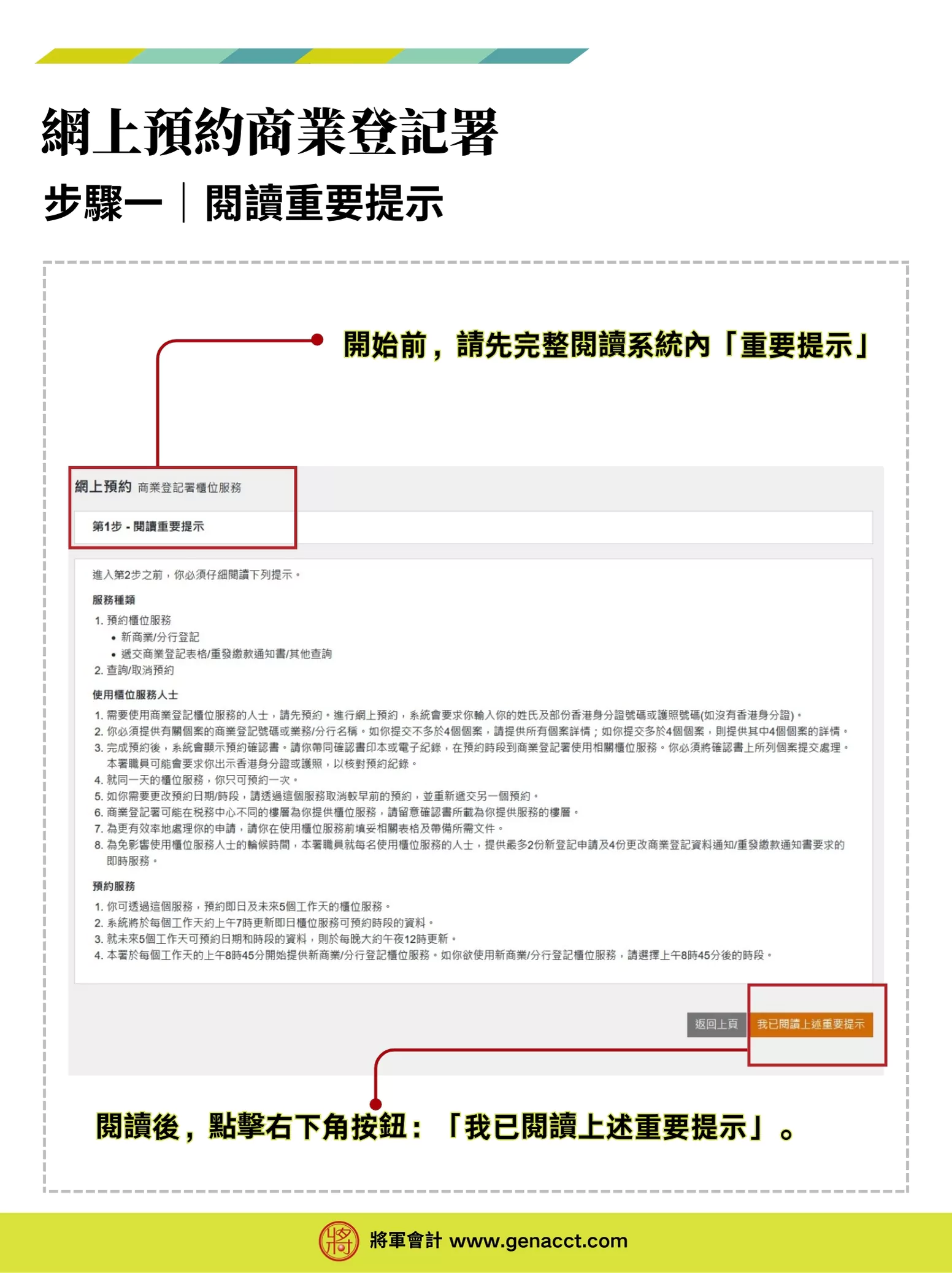
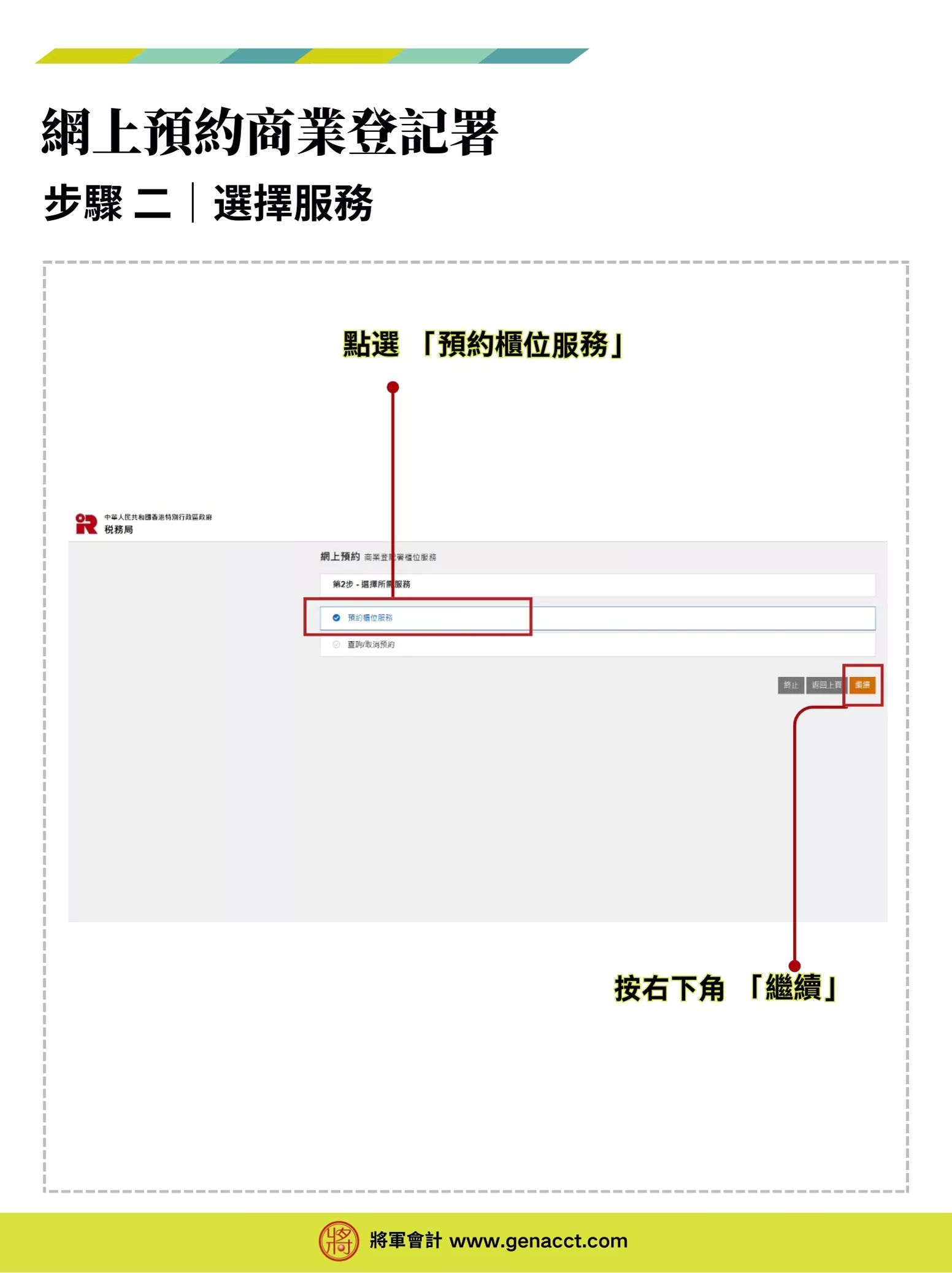
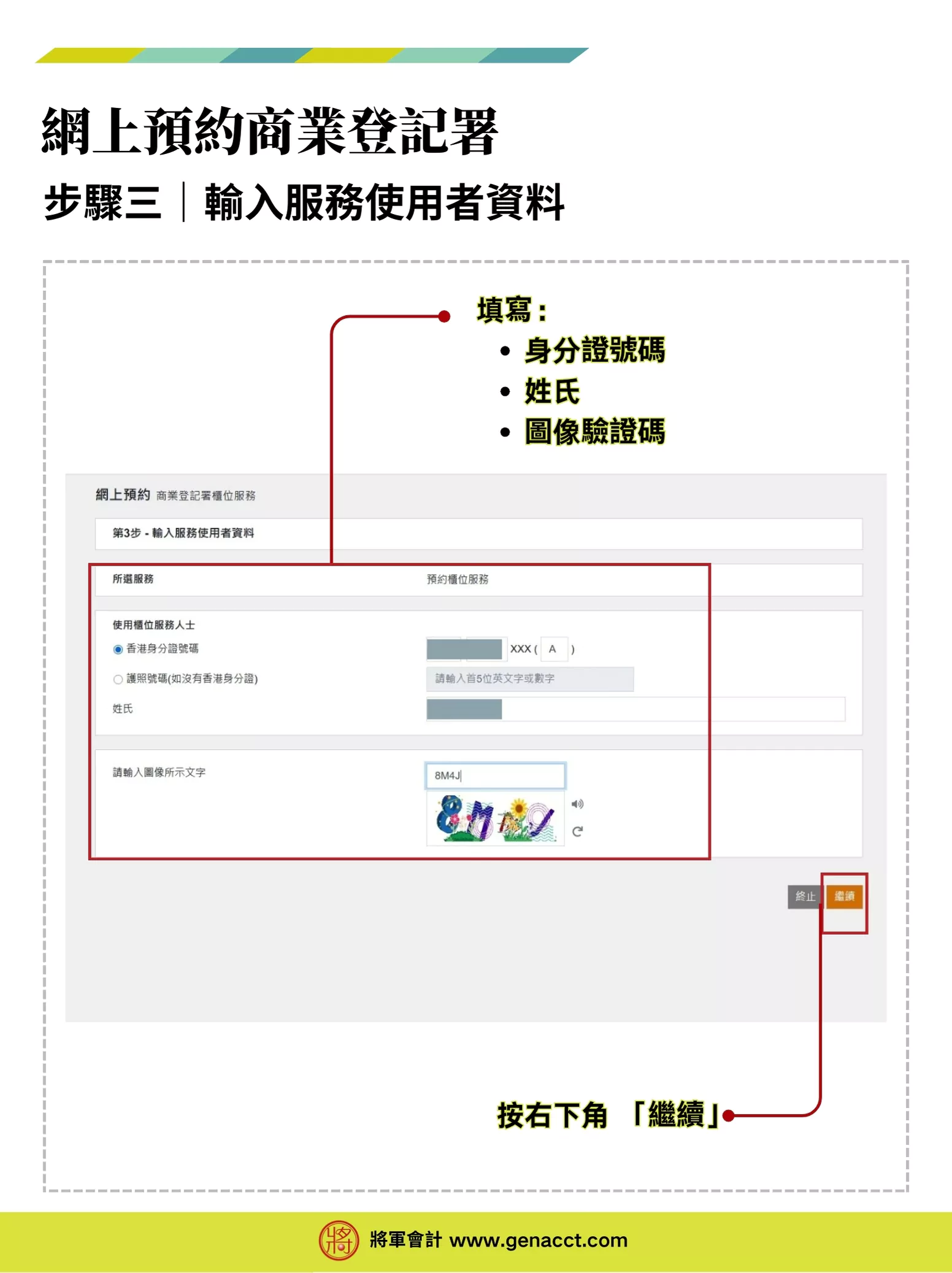
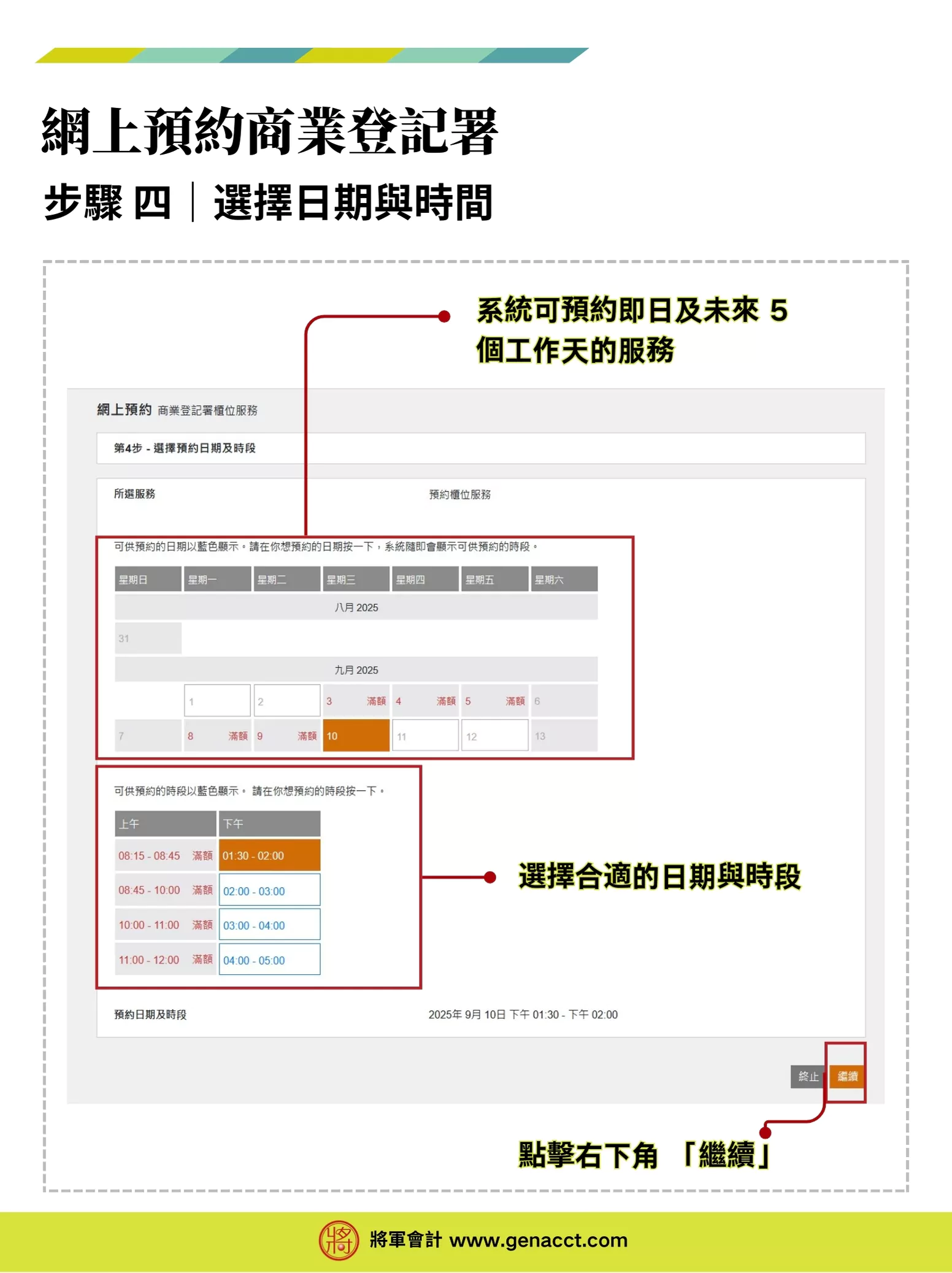
Go to the Online Appointment Booking for Business Registration Office Counter Services website and click “Start Service” at the bottom right to begin booking BR counter services online. The booking takes about 5–15 minutes.
4 steps to cancel a Business Registration Certificate appointment
If you are unable to use the Hong Kong Business Registration Certificate counter service at the scheduled time, you should cancel the appointment as soon as possible via the BR appointment platform to avoid wasting resources.
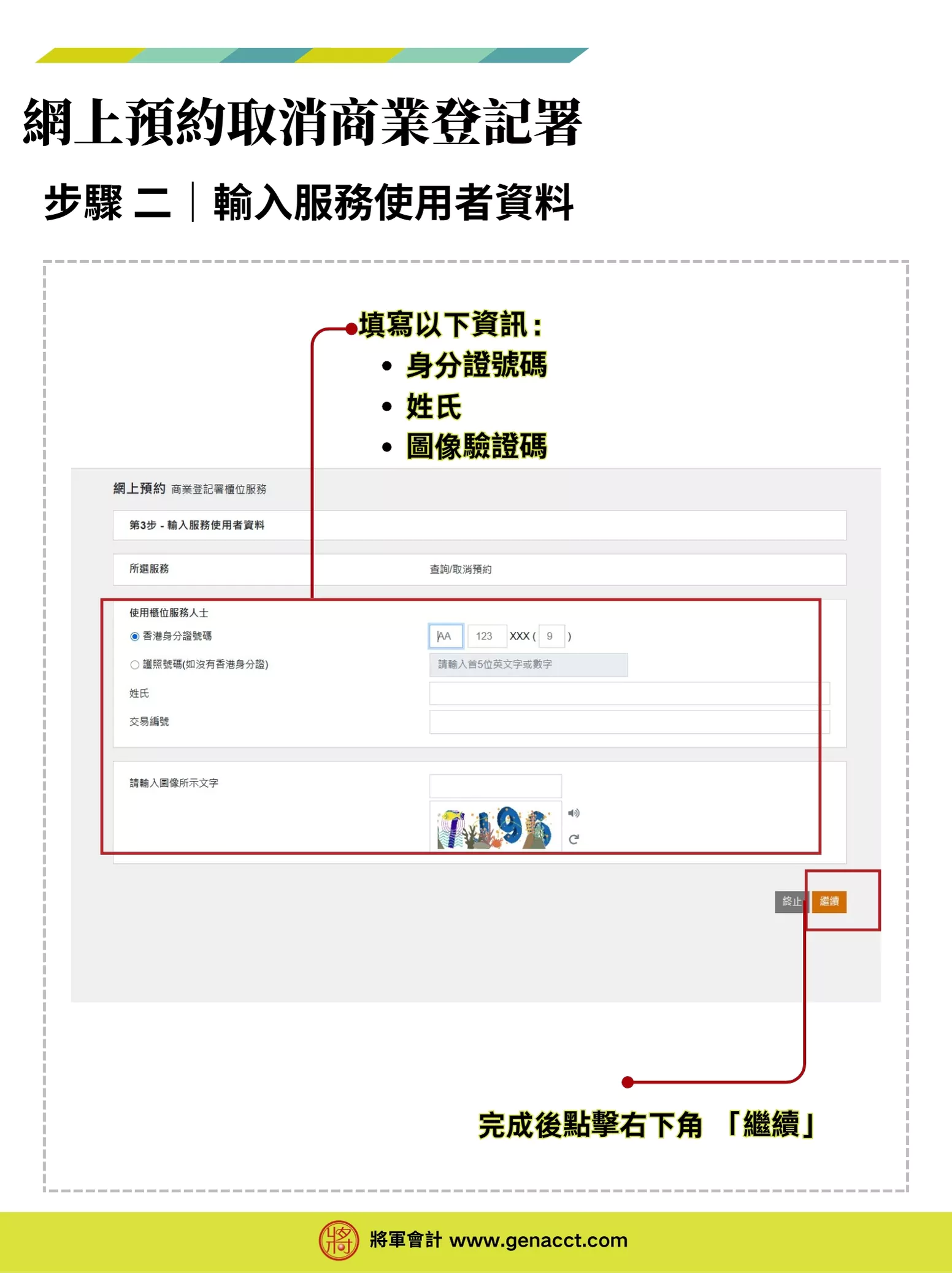
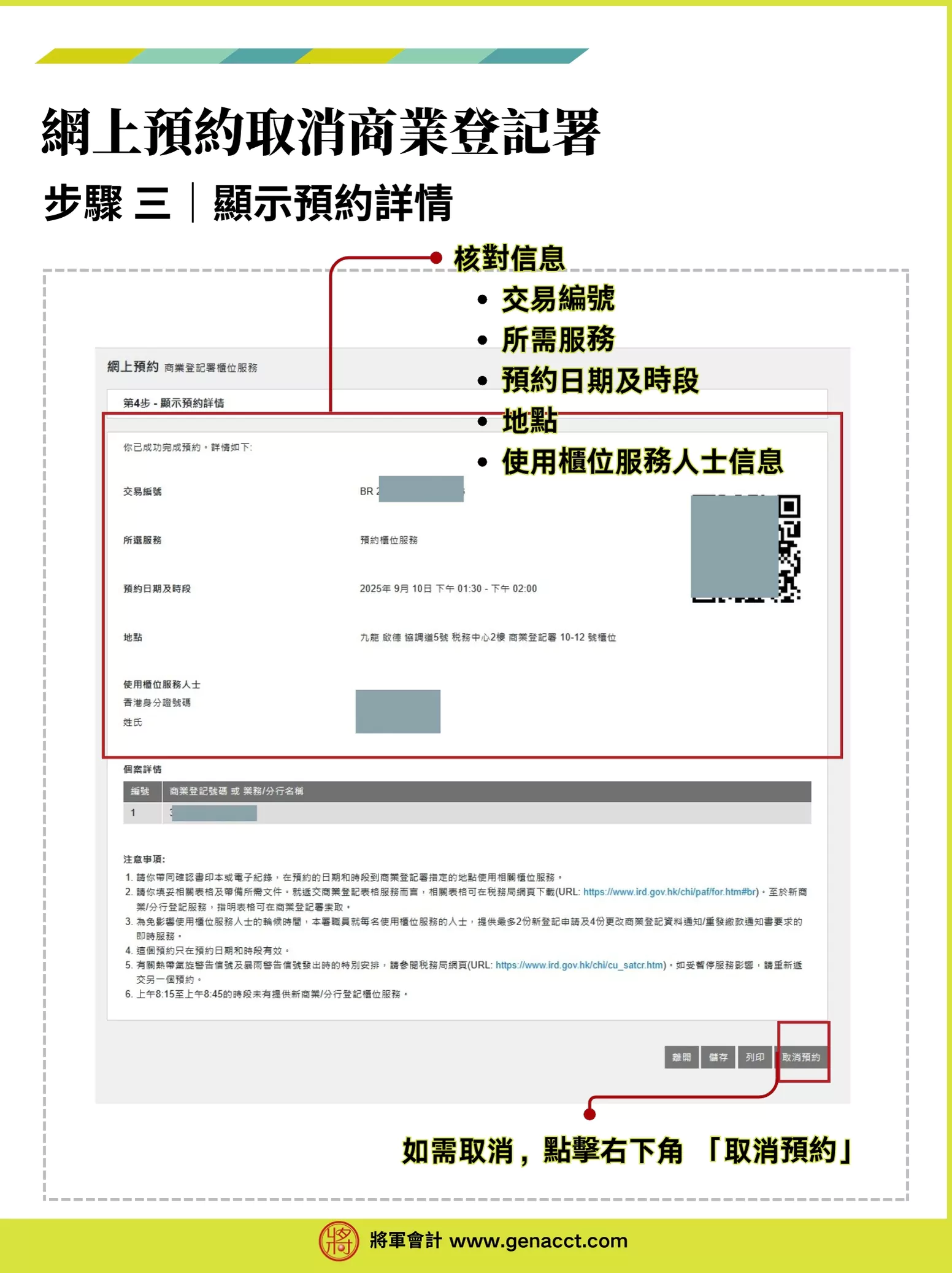
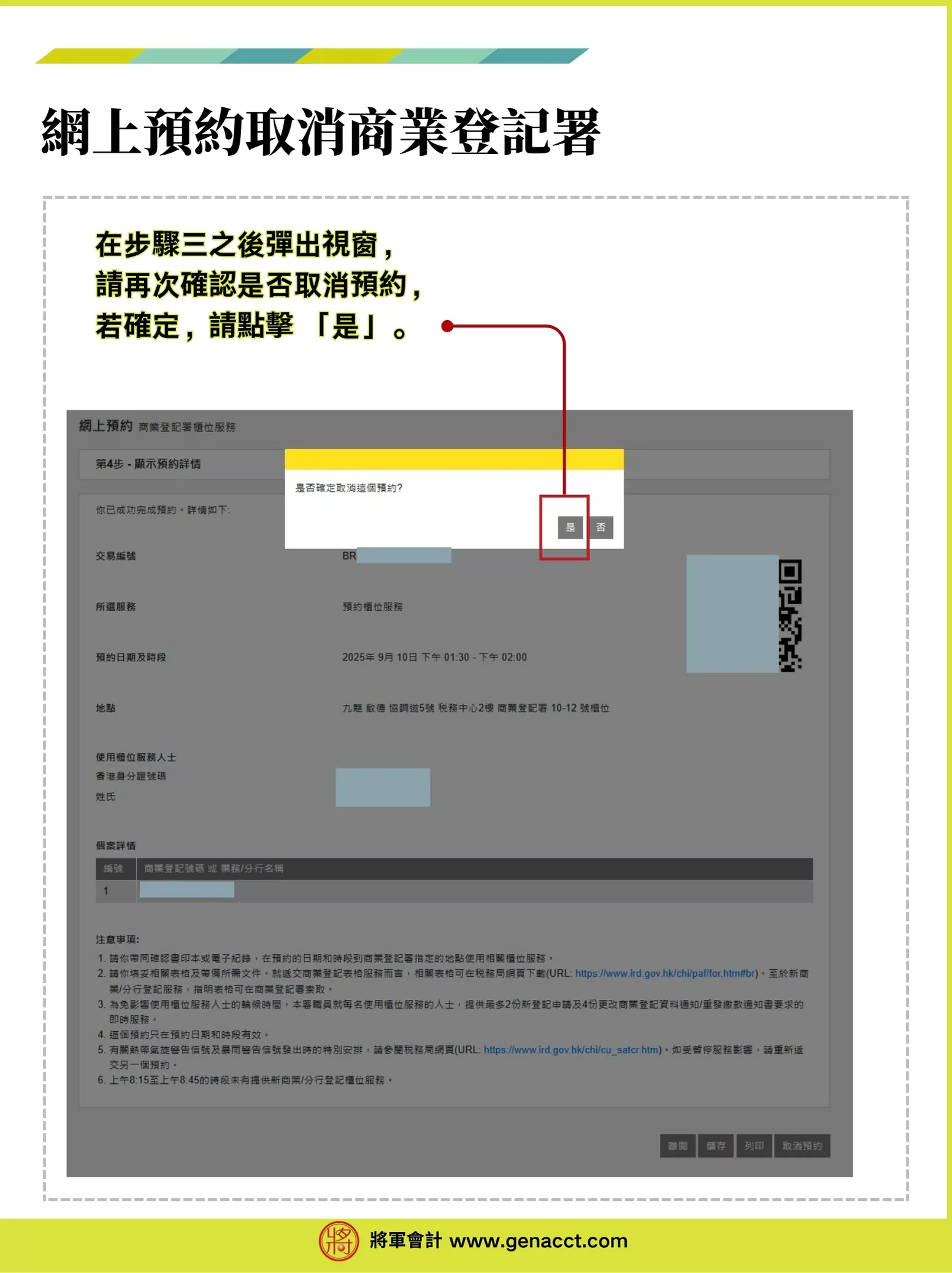
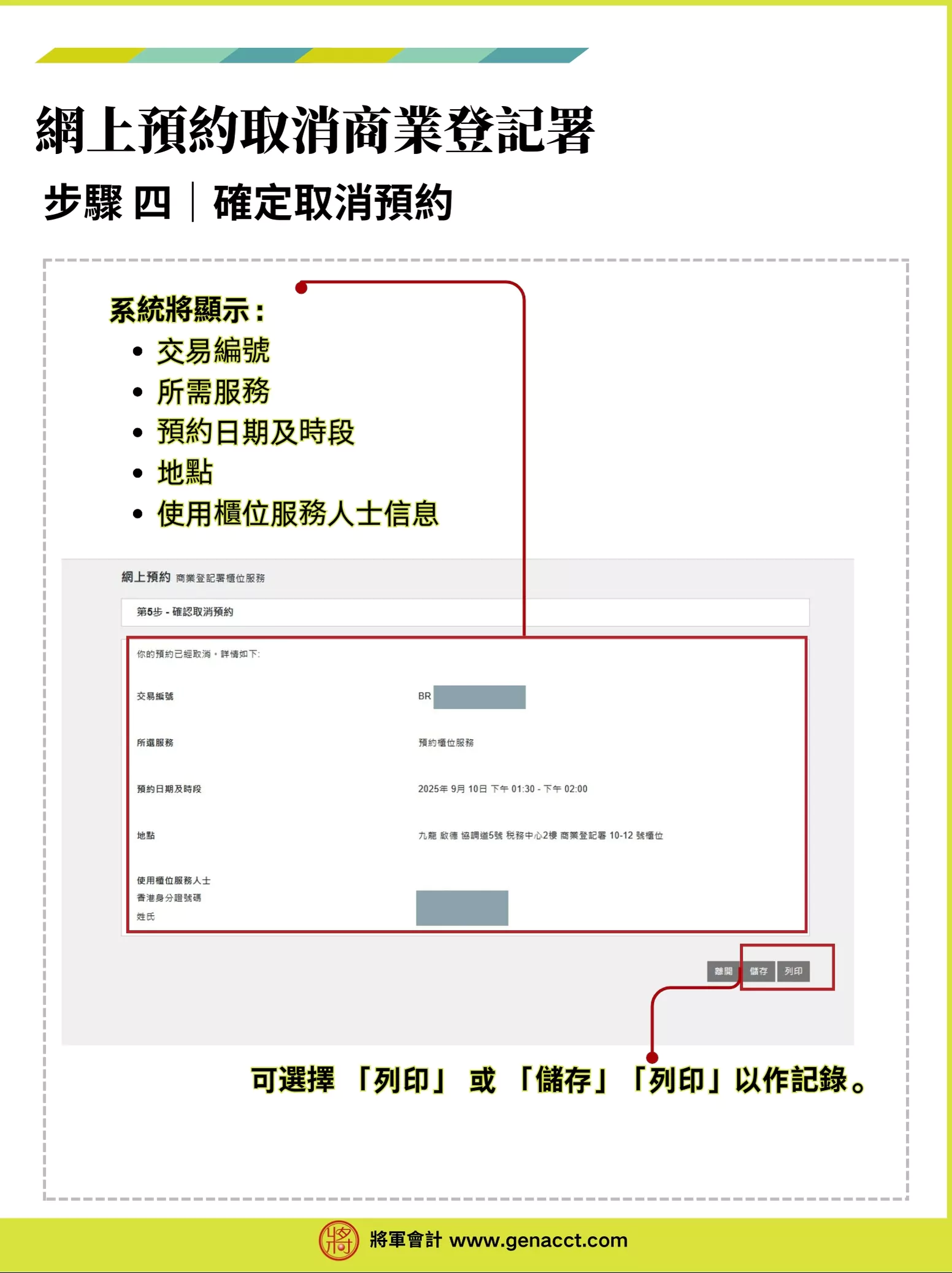
Go to the Online Appointment Booking for Business Registration Office Counter Services website. After reading and confirming the important notes above, follow the 4 steps below to cancel your Business Registration Certificate appointment:
Further reading: [Business Registration Cancellation] Procedures for Closing a Limited/Unlimited Company | 5 Common Mistakes to Avoid When Cancelling a BR!
Frequently Asked Questions
What should I do if the applicant cannot attend the IRD in person for the BR appointment?
You may choose to cancel or reschedule the appointment.
Can a business registration appointment be transferred to someone else?
No, but you may issue an authorisation letter for someone else to handle it on your behalf.
What documents do I need to bring after booking BR counter services?
The service user’s identity card and the Business Registration Office online appointment confirmation.
Conclusion
The above is the step-by-step guide to booking a Business Registration Certificate appointment, helping entrepreneurs save time and effort when applying for BR. With this guide, you have mastered the complete process for booking a Business Registration Certificate appointment online, enabling you to complete the registration process more efficiently.
General Accounting has been established for over 20 years and provides one-stop Business Registration Certificate services. Trust or Company Service Provider Licence No.: TC002940. If you have any questions about applying for BR for your start-up, our professional Customer Service Managers can provide free initial company formation consultation and assistance.
Further reading:
General Accounting offers free consultation
![[Business Registration Appointment] Step-by-Step Guide to Booking BR Counter Services Online 1 Business Registration Certificate appointment process – Step 1: Read the important notes](https://www.genacct.com/wp-content/uploads/2025/09/20250909143158.webp)
![[Business Registration Appointment] Step-by-Step Guide to Booking BR Counter Services Online 2 Business Registration Certificate appointment process – Step 2: Select a service](https://www.genacct.com/wp-content/uploads/2025/09/20250909143233.webp)
![[Business Registration Appointment] Step-by-Step Guide to Booking BR Counter Services Online 3 Business Registration Certificate appointment process – Step 3: Enter service user details](https://www.genacct.com/wp-content/uploads/2025/09/20250909143300.webp)
![[Business Registration Appointment] Step-by-Step Guide to Booking BR Counter Services Online 4 Business Registration Certificate appointment process – Step 4: Select date and time](https://www.genacct.com/wp-content/uploads/2025/09/20250909143220.webp)
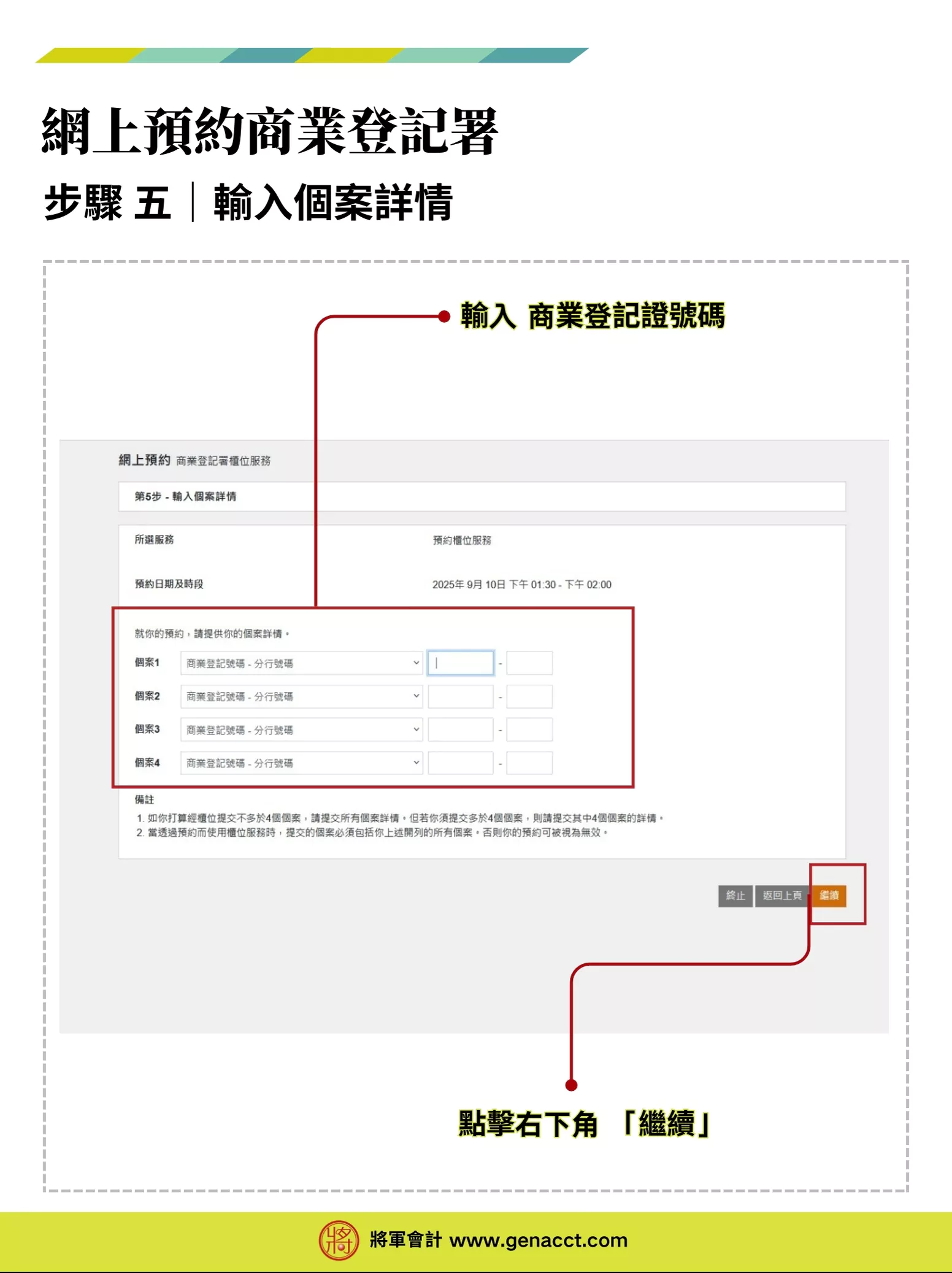
![[Business Registration Appointment] Step-by-Step Guide to Booking BR Counter Services Online 5 Business Registration Certificate appointment process – Step 5: Enter case details](https://www.genacct.com/wp-content/uploads/2025/09/20250909143228.webp)
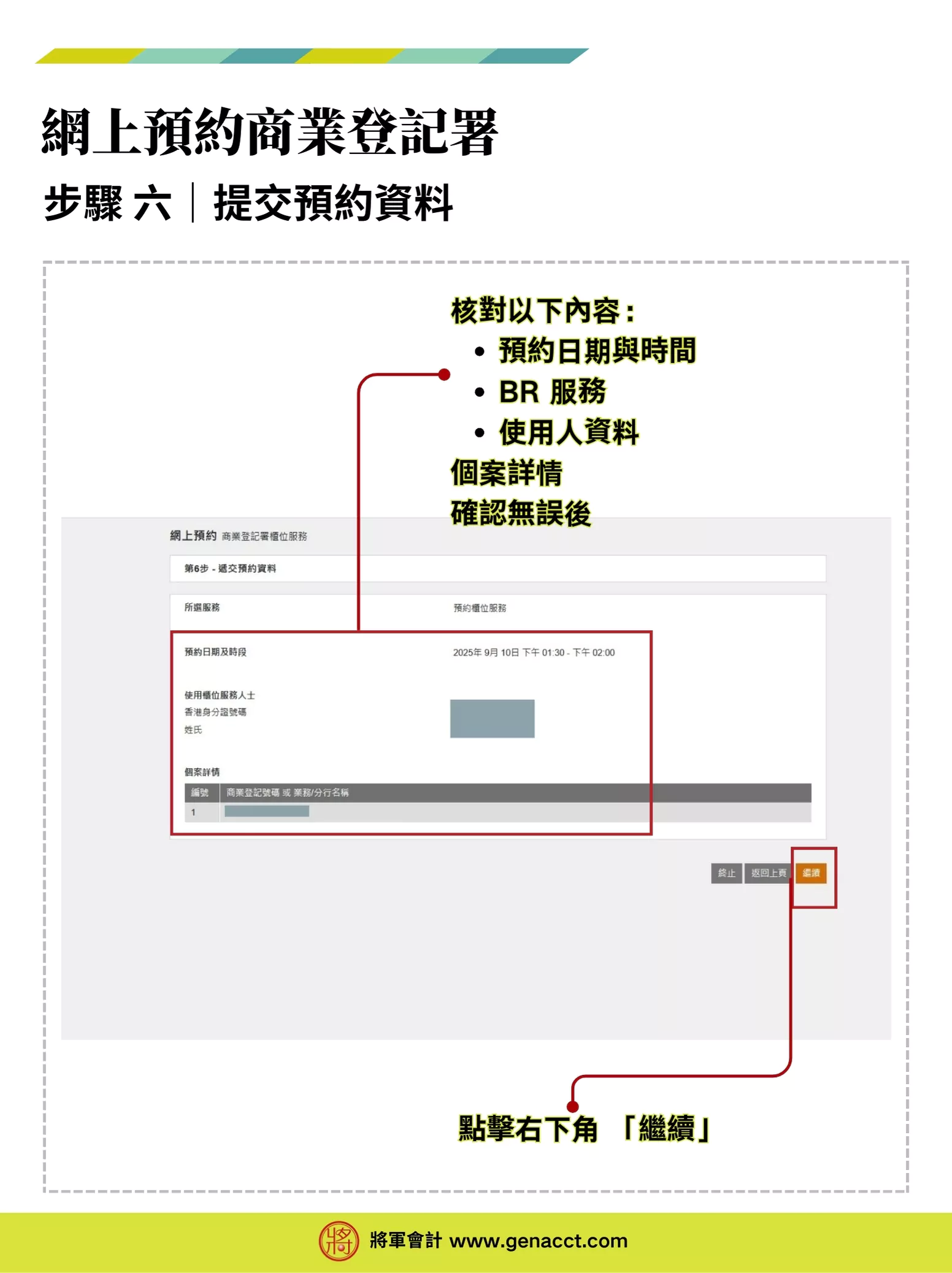
![[Business Registration Appointment] Step-by-Step Guide to Booking BR Counter Services Online 6 Business Registration Certificate appointment process – Step 6: Submit appointment details](https://www.genacct.com/wp-content/uploads/2025/09/20250909143239.webp)
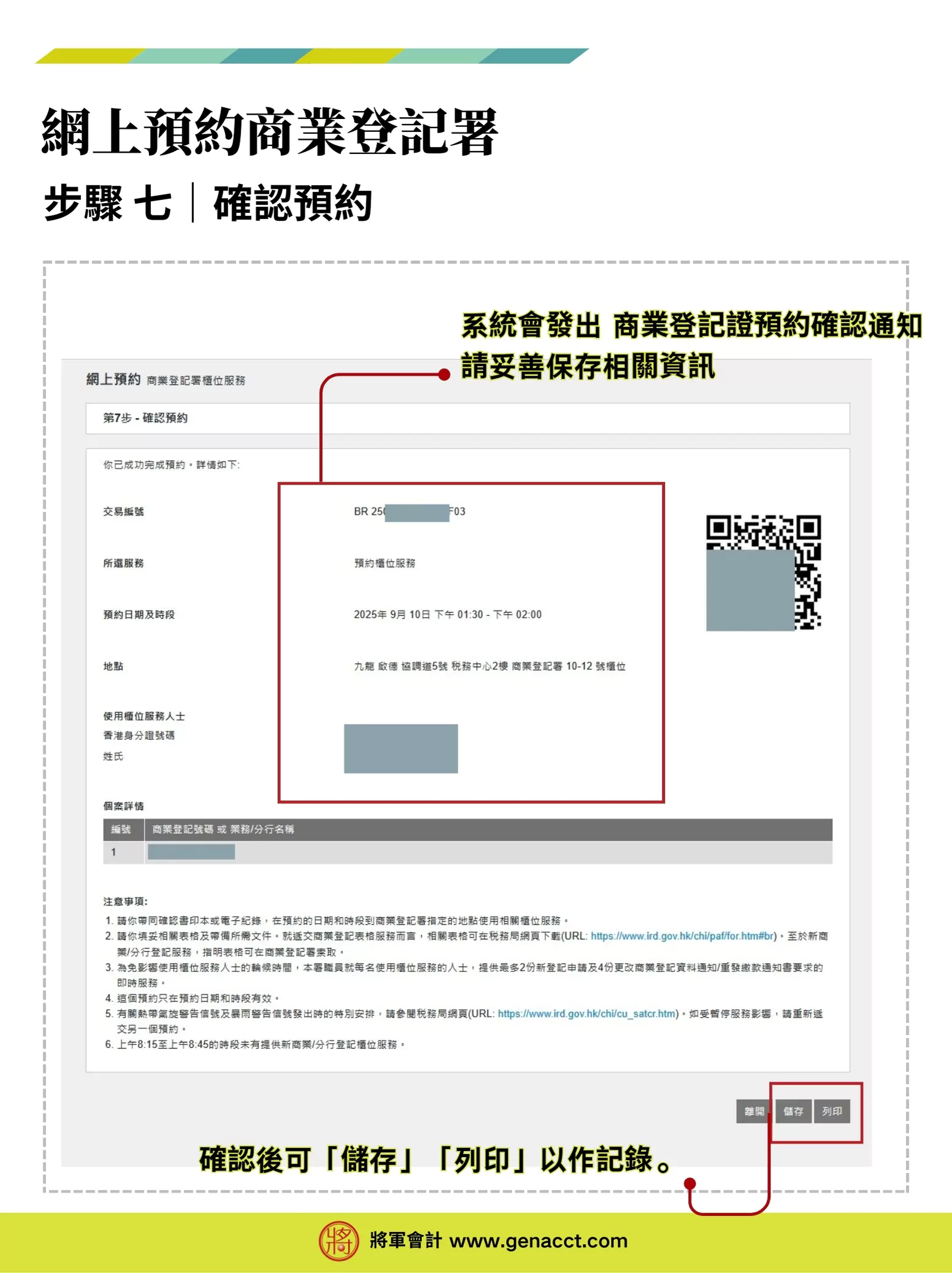
![[Business Registration Appointment] Step-by-Step Guide to Booking BR Counter Services Online 7 Business Registration Certificate appointment process – Step 7: Appointment confirmation completed](https://www.genacct.com/wp-content/uploads/2025/09/20250909143246.webp)
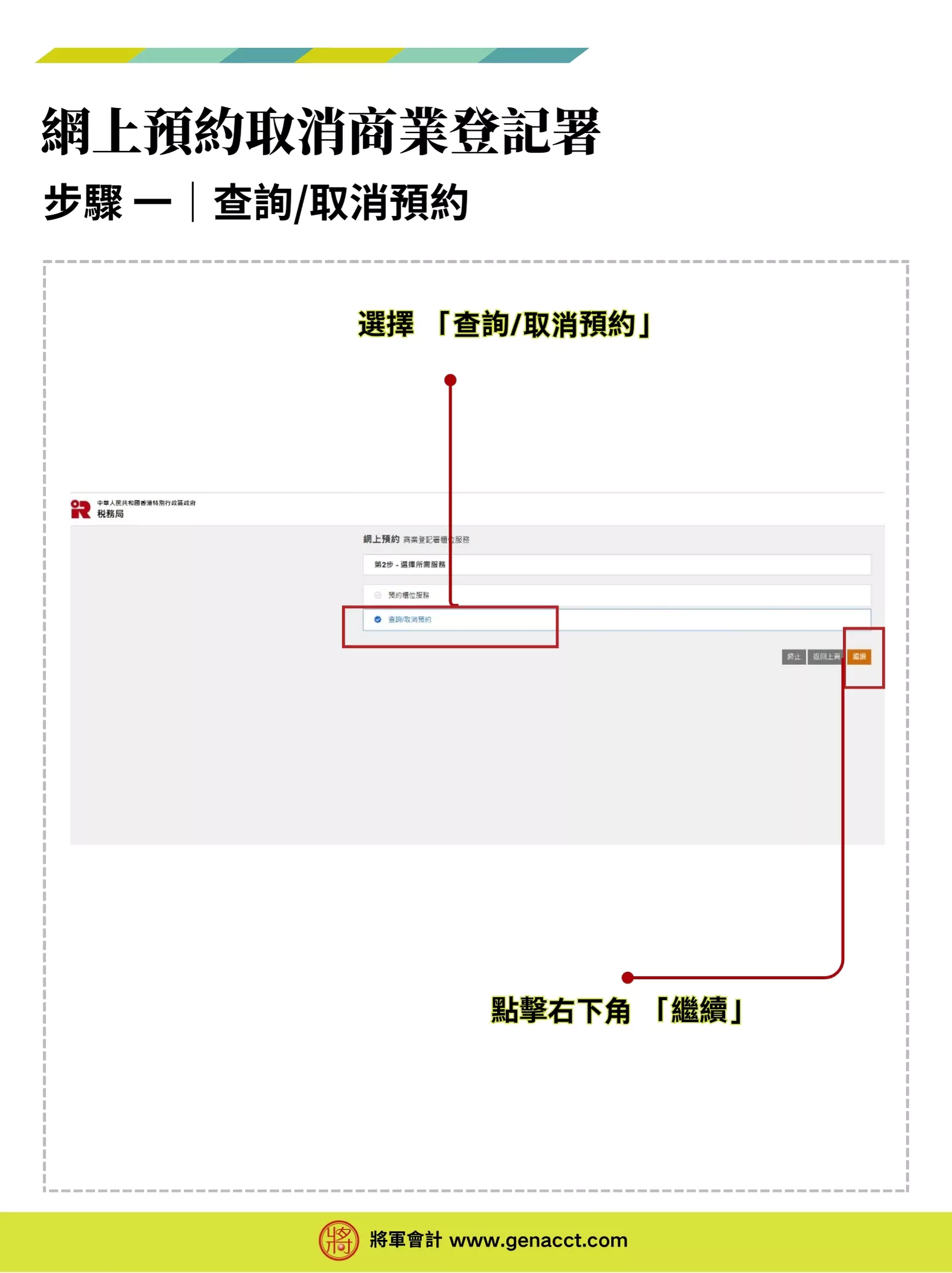
![[Business Registration Appointment] Step-by-Step Guide to Booking BR Counter Services Online 8 Cancel Business Registration Certificate appointment – Step 1: Enquiry/Cancellation](https://www.genacct.com/wp-content/uploads/2025/09/20250909143256.webp)
![[Business Registration Appointment] Step-by-Step Guide to Booking BR Counter Services Online 9 Cancel Business Registration Certificate appointment – Step 2: Enter service user details](https://www.genacct.com/wp-content/uploads/2025/09/20250909143251.webp)
![[Business Registration Appointment] Step-by-Step Guide to Booking BR Counter Services Online 10 Cancel Business Registration Certificate appointment – Step 3: Display appointment details](https://www.genacct.com/wp-content/uploads/2025/09/20250909143307.webp)
![[Business Registration Appointment] Step-by-Step Guide to Booking BR Counter Services Online 11 Cancel Business Registration Certificate appointment – Step 3.1: Confirm again whether to cancel the appointment. Click “Yes” to confirm.](https://www.genacct.com/wp-content/uploads/2025/09/20250909143313.webp)
![[Business Registration Appointment] Step-by-Step Guide to Booking BR Counter Services Online 12 Cancel Business Registration Certificate appointment – Step 4: Cancellation confirmed](https://www.genacct.com/wp-content/uploads/2025/09/20250909143318.webp)