
![[Start a Company Online] What is e-Incorporation? Same-Day Limited Company Setup Guide 2026](https://www.genacct.com/wp-content/uploads/2026/01/【網上開公司】電子成立公司是什麼?即日開有限公司教學2026.webp)
#Business Registration Application, #Start a Company Online, #e-services
Starting a company online is not only the most cost-effective way to incorporate a limited company, it can also be completed on the same day. With adequate preparation in advance, you can obtain your new company’s Certificate of Incorporation and Business Registration Certificate within one day. General Accounting is the first to share the most affordable and fastest step-by-step process for applying for a limited company online in 2026, teaching you how to use the e-Incorporation website to incorporate a limited company online on the same day!
Entrepreneurs may also refer to our other article on the limited company incorporation process to compare the differences between the two incorporation methods. You may also consider buying a shelf company as a fast option for setting up a company.
For more details: Limited Company Registration Service | Shelf Companies
What is e-Incorporation?
e-Incorporation is the online limited company registration service provided by the Companies Registry. It replaced the previous e-Registry system on December 27, 2023, enabling the public to submit applications for limited company incorporation and business registration online. Compared with using e-Registry to register a limited company online, “e-Incorporation” offers the following features:
One account, multiple uses
Before using the e-Incorporation service, you must first register for an electronic services account with the Companies Registry (the “CR e-services account”). With the same CR e-services user account, you can not only register a limited company online, but also conduct company searches, file company documents, and check company names online.
More detailed step-by-step guidance
It clearly outlines the 7 steps to start a company online, making the process easier for users, and providing clearer guidance on completing e-Incorporation forms and following up on the application workflow.
Data-saving function
After completing the online e-Incorporation forms, you can save them within the e-services website and submit the company registration application within 10 days.
Mobile-friendly
Users can complete and submit online company registration applications using a tablet or mobile phone, with Apple Pay and Google Pay added as payment options.
What are the benefits of starting a company online?
Enjoy a 10% discount
The original company registration fee is HK$1,720, and is now only HK$1,545.
24-hour service
Company registration is available 24 hours a day, 365 days a year. If you have enquiries or need assistance, the support team provides 24-hour assistance.
No geographical limits
In addition to using a computer, you can also use a smartphone to register a company anytime, anywhere.
Multi-functional platform
In addition to company incorporation, you can also pay for specified filings, use the Annual Return e-Reminder service, and the “e-Monitor” service.
Same-day incorporation of a Hong Kong company
The Companies Registry undertakes to complete the company incorporation procedure within 1 hour and issue the “Certificate of Incorporation” and “Business Registration Certificate” on the same day.
Multiple payment methods accepted
You can pay the company registration fee by credit card (Visa/Mastercard/JCB/UnionPay), e-wallet (Apple Pay or Google Pay), PPS, or Faster Payment System (FPS).
Model Articles of Association templates available
There are two model templates for the Articles of Association of a private company limited by shares, so you do not need to draft them yourself. If you have special requirements, you may draft your own Articles of Association.
Save time
No need to visit the Companies Registry in person—the entire company registration process can be completed online.
How to incorporate a limited company on the same day? Required documents and pre-registration preparation for incorporating a Hong Kong company online
Although the Companies Registry can issue the CI and BR on the same day, entrepreneurs must also prepare in advance in order to complete company registration as efficiently as possible on the same day.
Register a CR e-services account
Each founding member and the first directors of the company to be incorporated must register a CR e-services account in advance.
If you have not registered a CR e-services account, please refer to the relevant article: Companies Registry e-Services User Registration Guide.
If you have previously registered an e-Registry account, you need to first migrate it to a Companies Registry e-services user account. For details, please refer to the relevant article: e-Registry Account Migration Guide.
Company name search
A limited company name cannot be duplicated. You must first verify the name via the Online Search Centre website.
Registered office
It must be a Hong Kong business address. PO boxes, subsidised housing, or residential-use addresses are not accepted. If you do not have a business registered address, you may use a virtual office service.
Appoint a first company secretary who holds a TCSP (Trust or Company Service Provider) licence
When completing parts of the new Form NNC1 for online company registration, you must provide the company secretary’s TCSP licence number. If you cannot provide the company secretary’s licence number, you must state the reason. If an acceptable reason cannot be provided, the application may be delayed or the online company registration may fail.
Determine the company’s share capital
Determine the company’s share capital and the shareholding ratio of shareholders.
Prepare the company’s Articles of Association
There are two model templates for the Articles of Association of a private company limited by shares, so you do not need to draft them yourself. If you have special requirements, you may draft your own Articles of Association.
**Note: The Companies Registry requires time to review customised Articles of Association, which will extend the processing time for online company registration.
Tutorial: Logging in to the e-Incorporation website
Step 1: Log in to the CR website
Log in to the Companies Registry e-services website (http://www.e-services.cr.gov.hk), enter your CR e-services username and password, then click Log in.

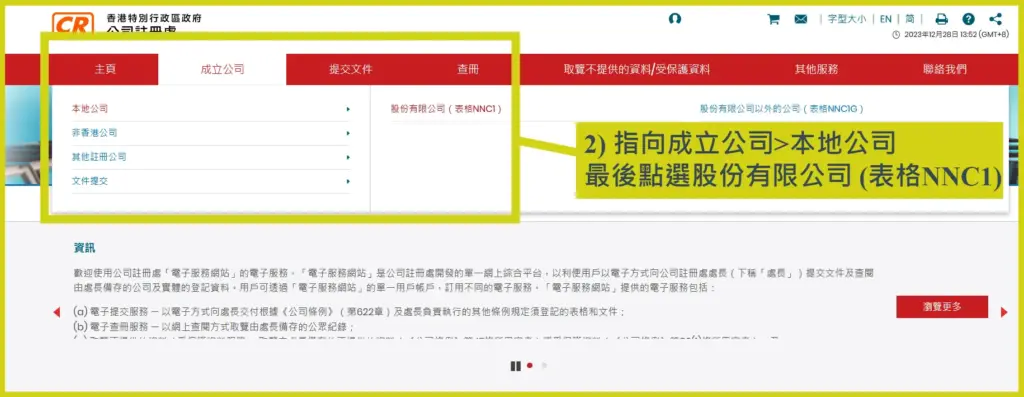
Step 2: Select Form NNC1
After logging in, point to Incorporate a Company>Local Company, then select “Company Limited by Shares (Form NNC1)”.
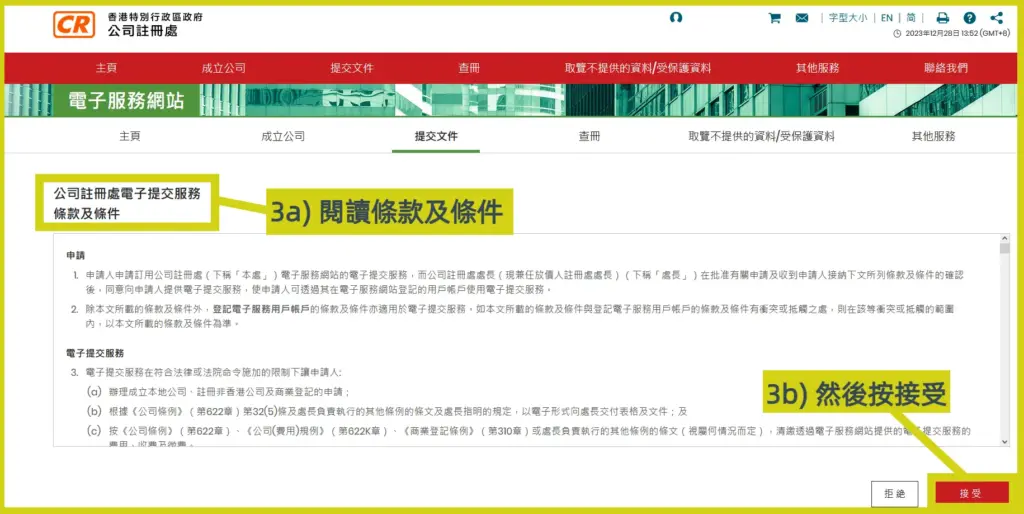
Step 3: Complete
Read the terms and conditions, then click Accept. The login process will be completed and you can begin registering a Hong Kong limited company online.
7-step online company incorporation process
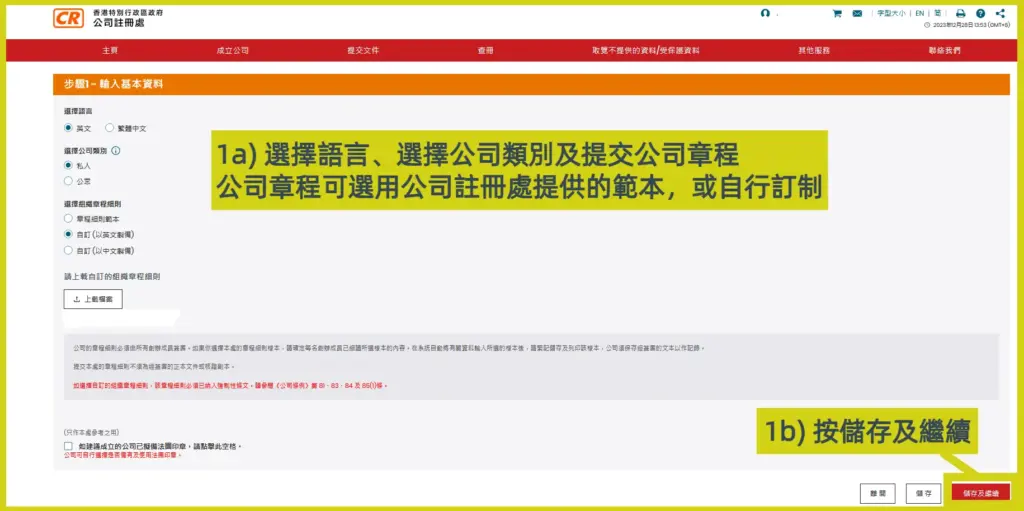
Step 1: Enter basic information
1a) Select the language, select the company type, and submit the Articles of Association;
1b) Select the Articles of Association. It is recommended to tick “Sample A (Simplified Format)”. Sample A is suitable for general Hong Kong limited companies. You may also choose to upload your self-drafted Articles of Association.
**Note: The Companies Registry requires time to review customised Articles of Association, which will extend the processing time for online company registration.
For more details: Understanding the 6 Key Uses of the Articles of Association (AA)
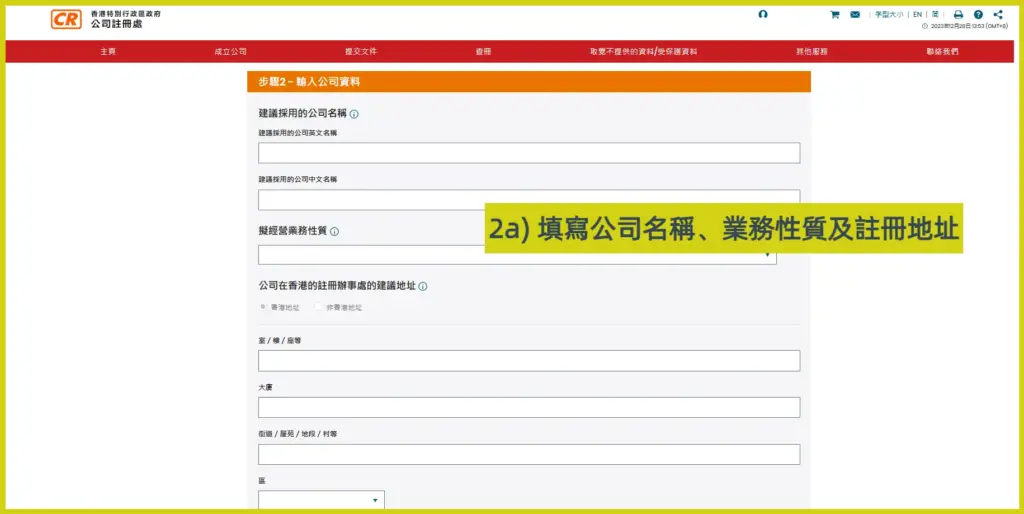
Step 2: Enter company information
2a) Enter the Hong Kong limited company name, nature of business, and registered address;
For more details: How to choose the nature of business for a Hong Kong company?
2b) Enter contact information and share capital information;
2c) Then click Save and Continue.
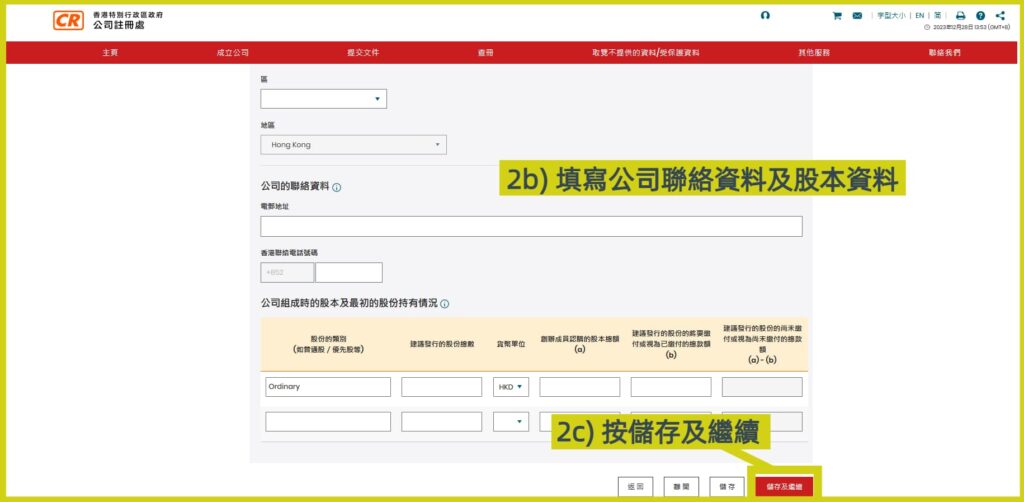
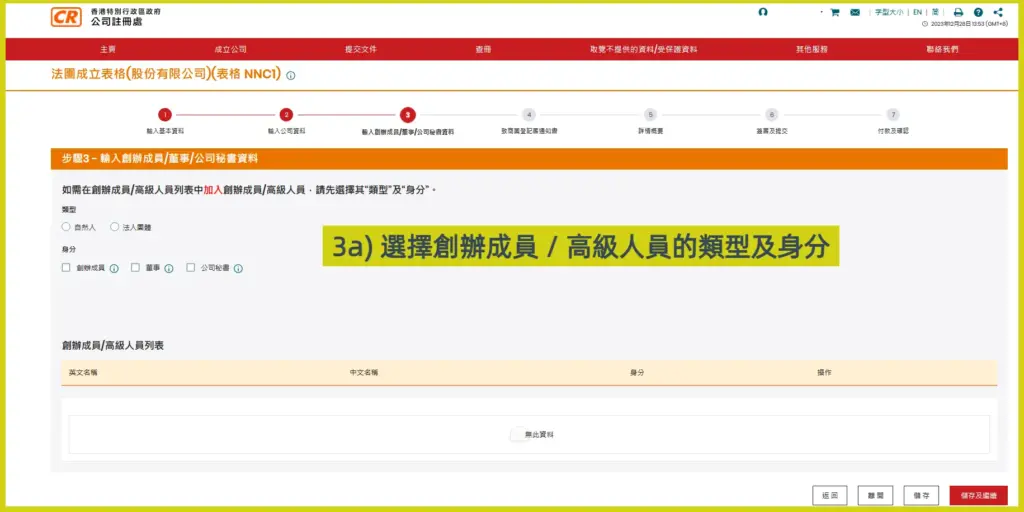
Step 3: Enter information of founders / directors / company secretary
3a) Select the type and identity of the founder(s) or officer(s);
Natural person: serving as a company member in an individual capacity;
Body corporate: serving as a company member in a corporate/company capacity.
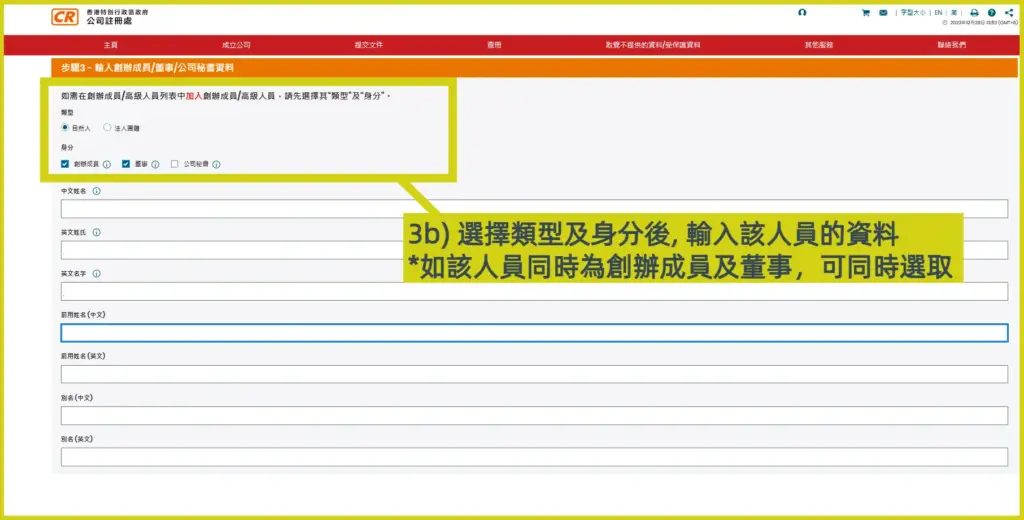
3b) Select the identity of the director / founder (shareholder). One person may concurrently serve as director and shareholder, but if the company has only one member (a one-person company), you must appoint a third party as the company secretary;
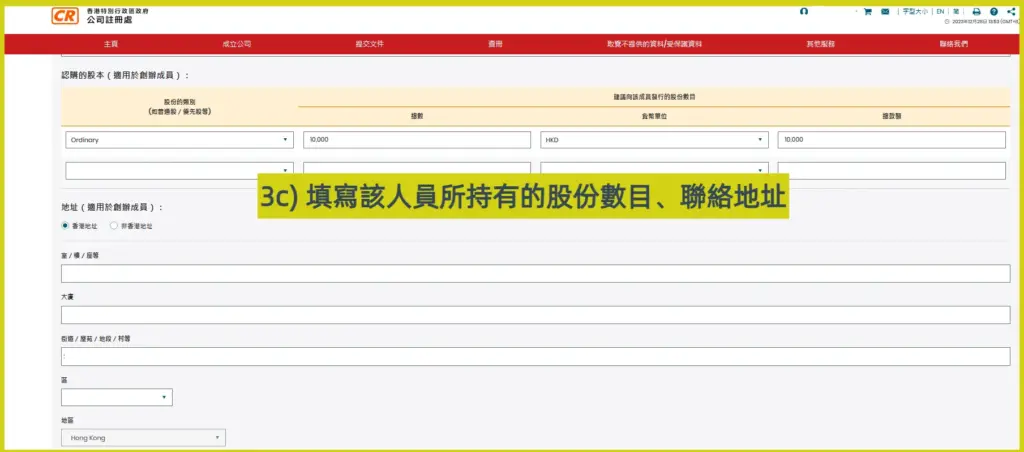
3c) Enter the number of shares held by the shareholder and the correspondence address. The address can be a business address or an overseas address;
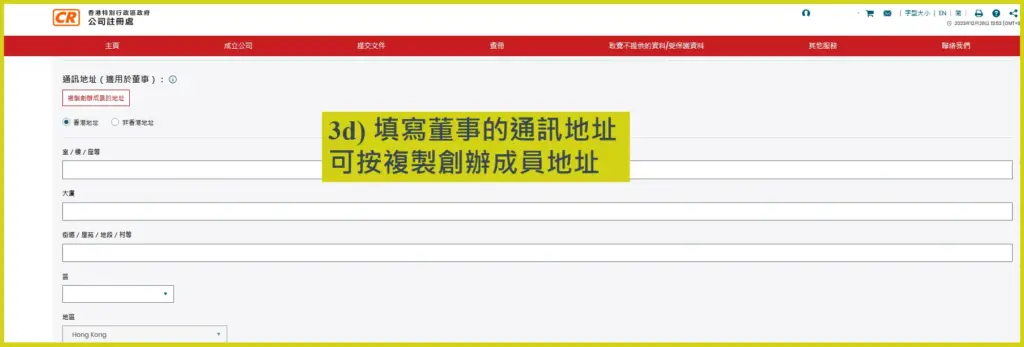
3d) Enter the director’s correspondence address. If this address is the same as the founder’s correspondence address, click Copy Founder’s Address;
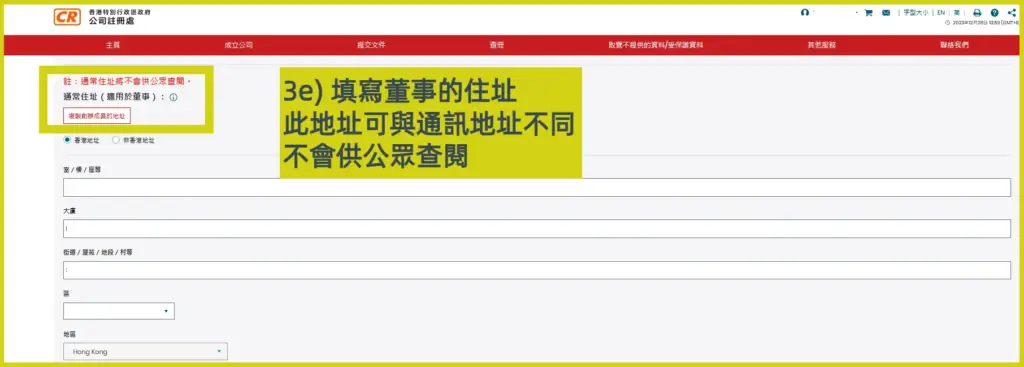
3e) Enter the director’s residential address. If this address is the same as the founder’s correspondence address, click Copy Founder’s Address;
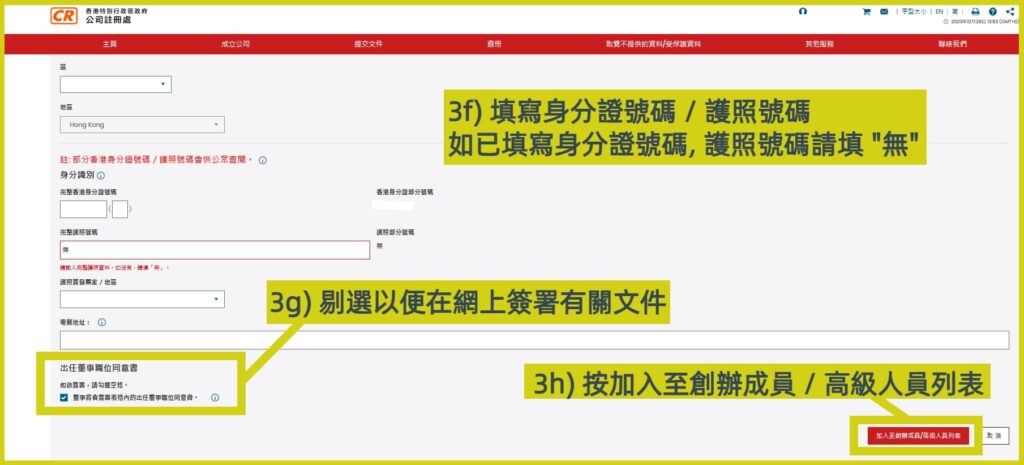
3f) Enter the Hong Kong Identity Card number or passport number. If you have entered the HKID number, enter “N/A” in the passport number field;
3g) Tick to sign the “Consent to Act as Director” so that the relevant document can be signed online. If you do not tick it, you will need to submit the Consent to Act as First Director (Form NNC3) separately;
3h) After completion, click “Add to Founder(s) / Officer(s) List”;
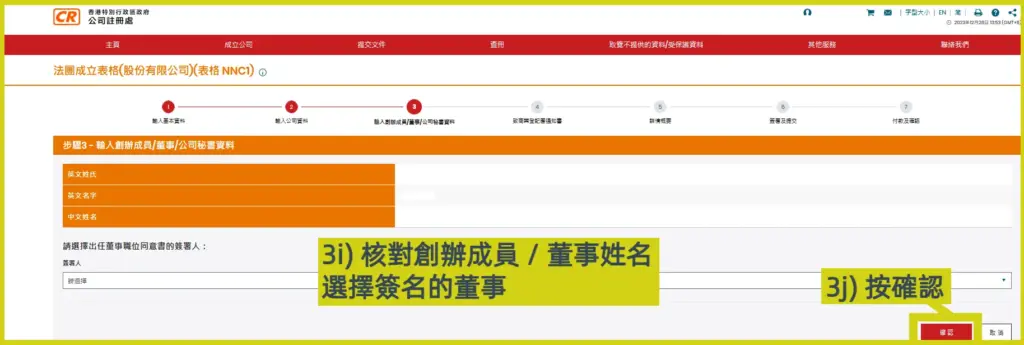
3i) Verify the name of the founder(s) / director(s), then select the person as the signatory;
3j) Finally, click Confirm;
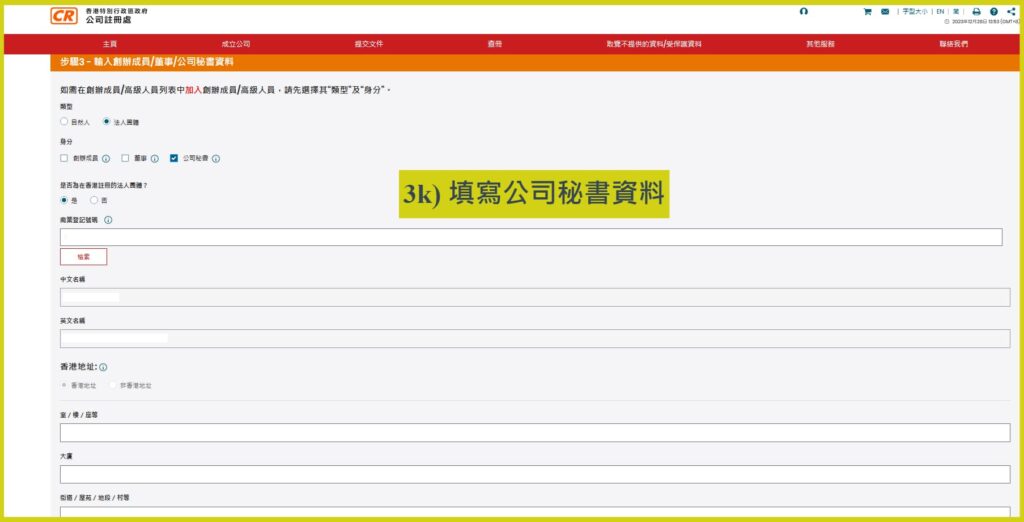
3l) If the company secretary is not required to be licensed, provide the reason;
3m) After completion, click “Add to Founder(s) / Officer(s) List”;
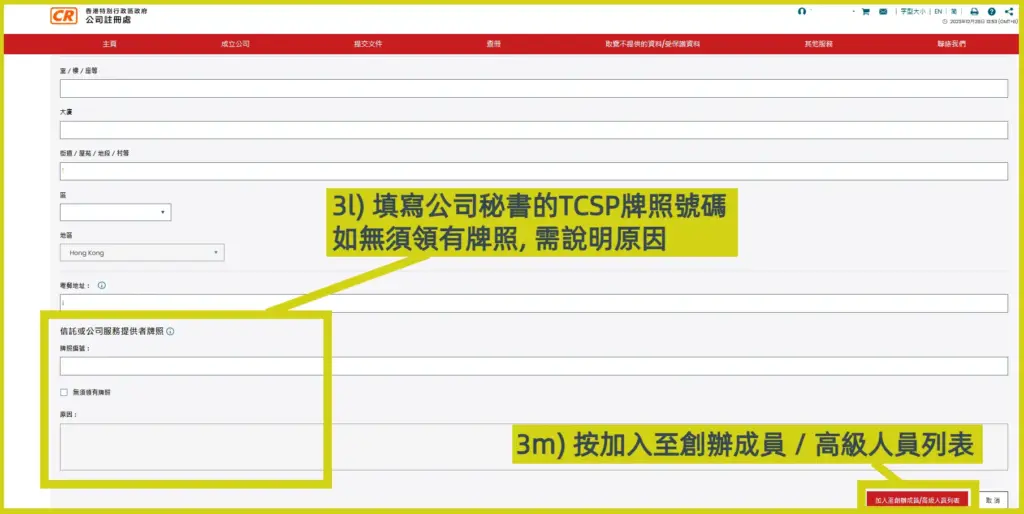
3n) If there are no other founders / officers to add, verify the online Hong Kong incorporation information, then click Save and Continue;
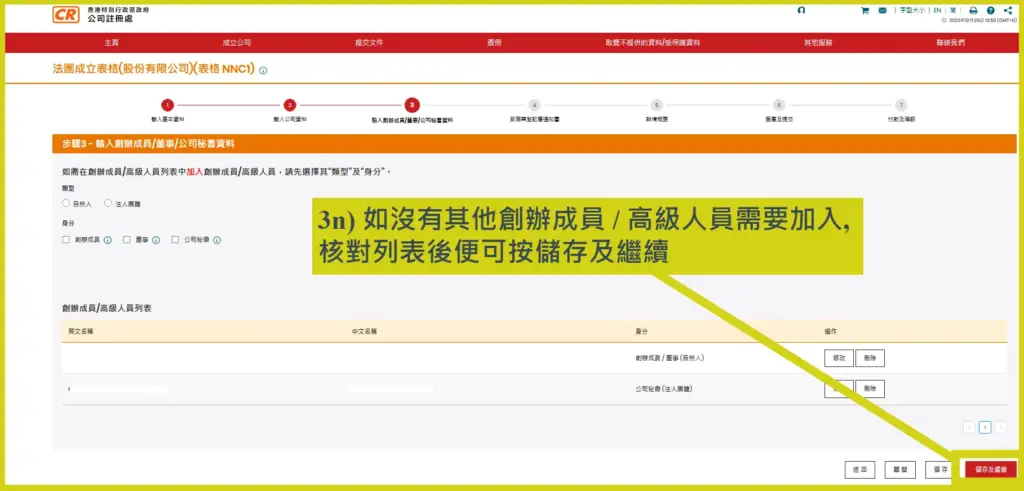
3o) Select the founding member who will sign, then click Save and Continue
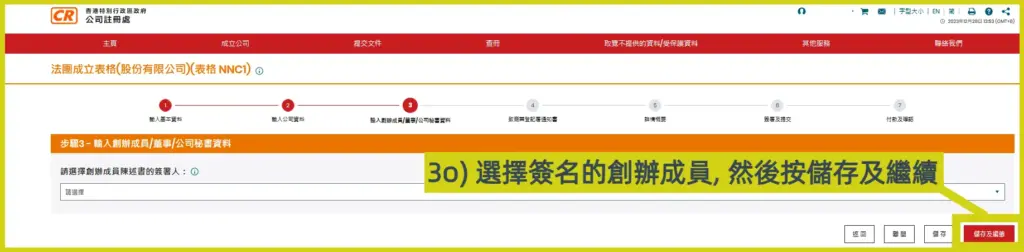
Step 4: Notice to Business Registration Office (IRBR1)
Select the validity period of the Business Registration Certificate, then click Save and Continue;
If you choose a 3-year Business Registration Certificate, select “Yes”;
If you choose a 1-year Business Registration Certificate, select “No”.
For 2025/26, the BR fee is HK$2,350 (one-year certificate) and HK$6,170 (three-year certificate). Business registration fees are adjusted each year in accordance with the Budget. Before starting a company online, you may visit the Inland Revenue Department website for the latest BR fees.
More BR Fee 2026 information: [Business Registration Certificate Fees] BR Fee increased to $2,350! Latest 2026 Notes and Money-Saving Tips
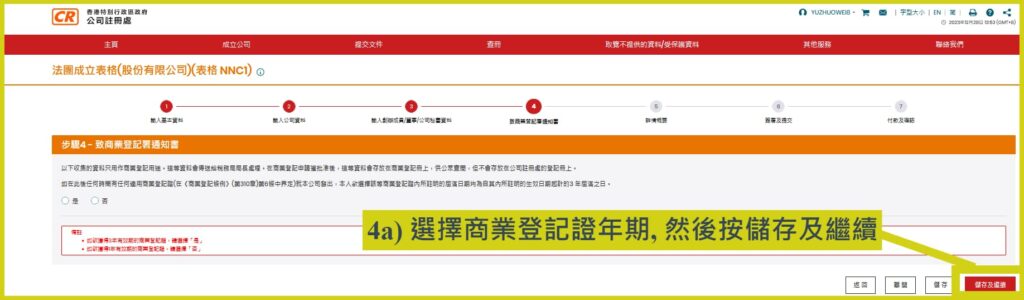
Step 5: Summary of details
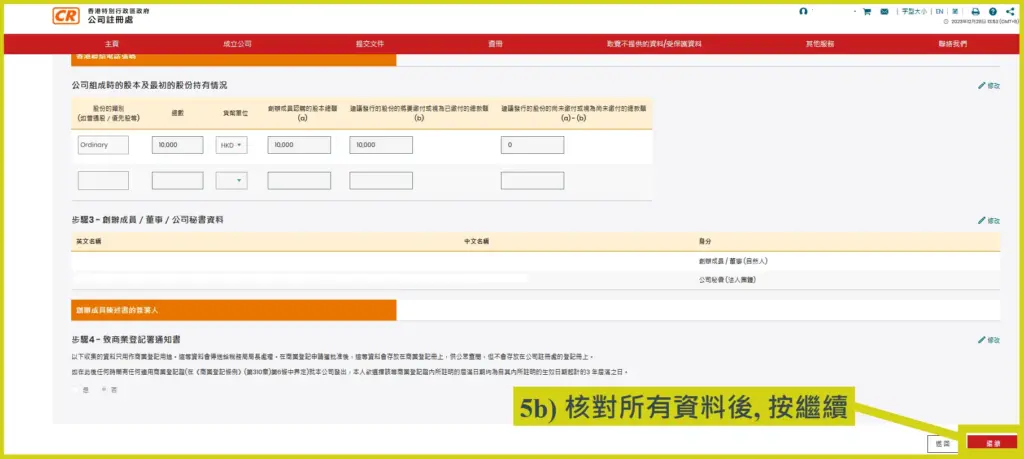
5a) After completing Steps 1–4, the completed Form NNC1 and the summary of the Notice to Business Registration Office will be displayed;
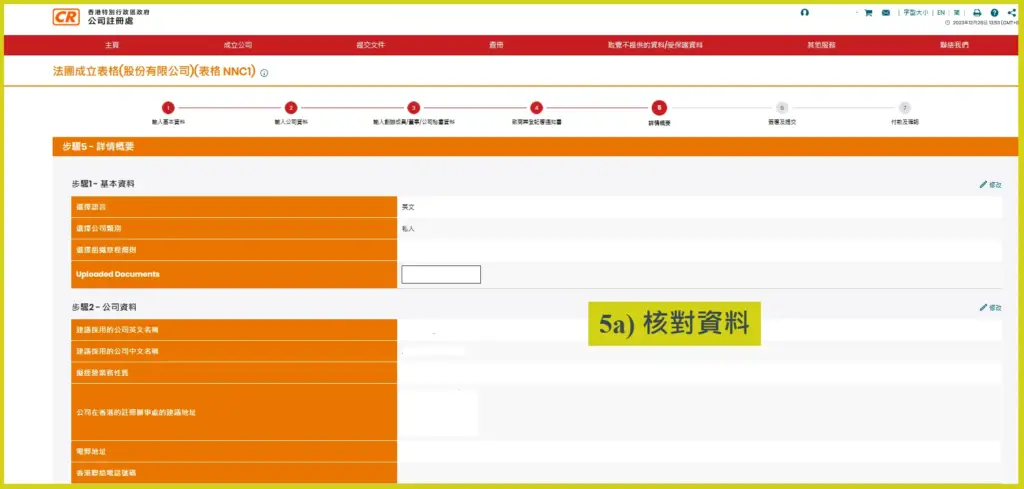
5b) Verify that the information is correct, then click Continue.
Step 6: Sign and submit
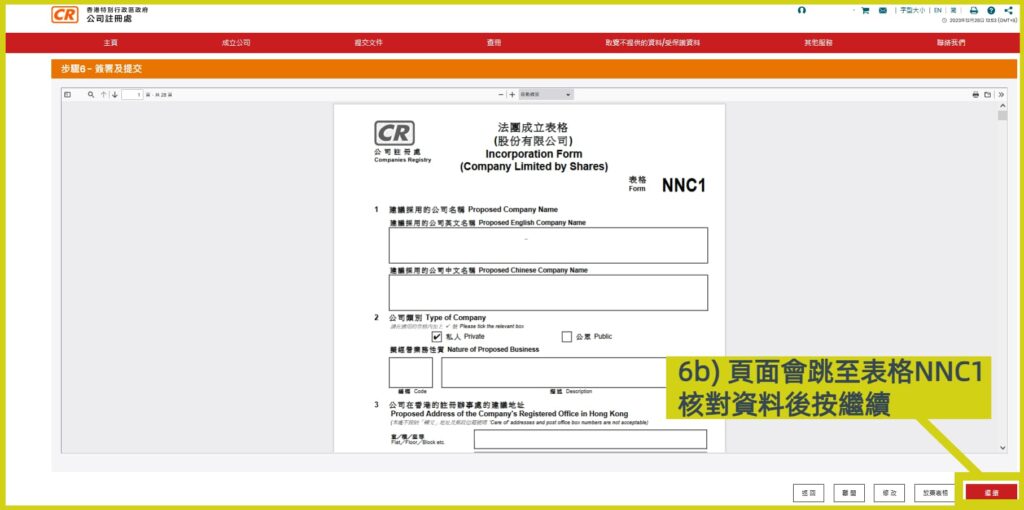
6a) Click Preview and Sign. The e-Incorporation system will automatically generate the Incorporation Form (Form NNC1);
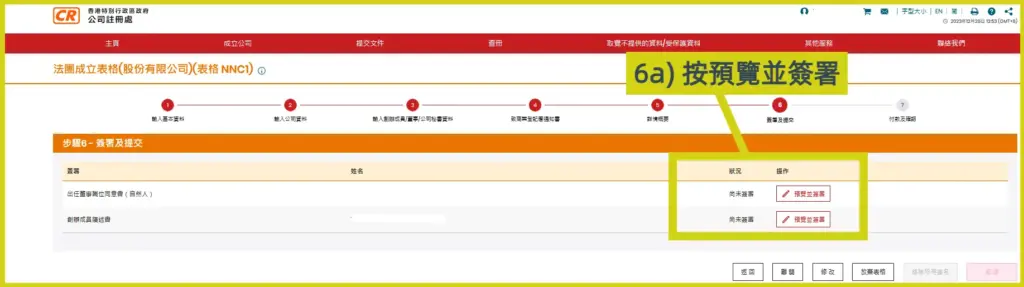
6b) After the applicant verifies that the information is correct, click Continue;
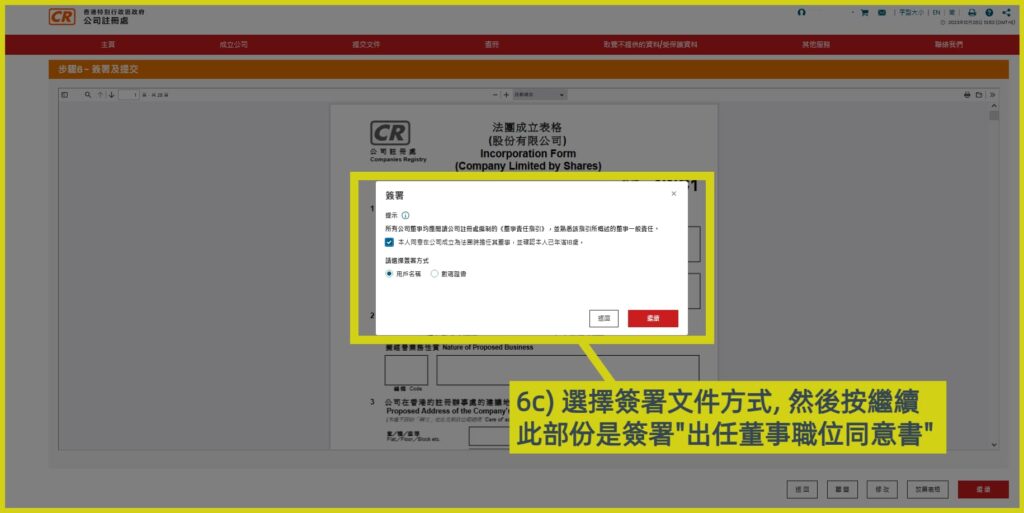
6c) The first director selects the method to sign the “Consent to Act as Director”. After selecting the signing method, click Continue;
*In this tutorial, the online company registration form is signed using the applicant’s username.
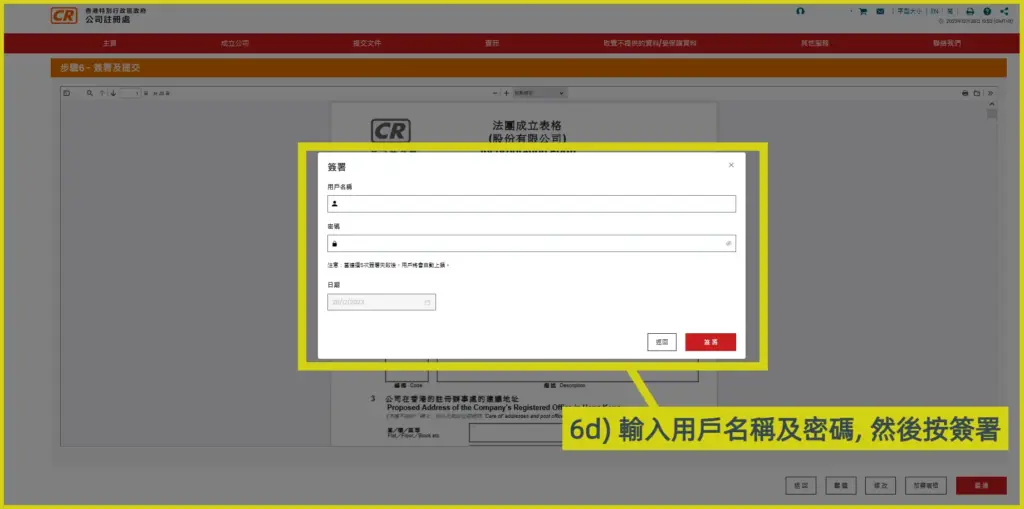
6d) Enter the CR e-services username and password, then click Sign;
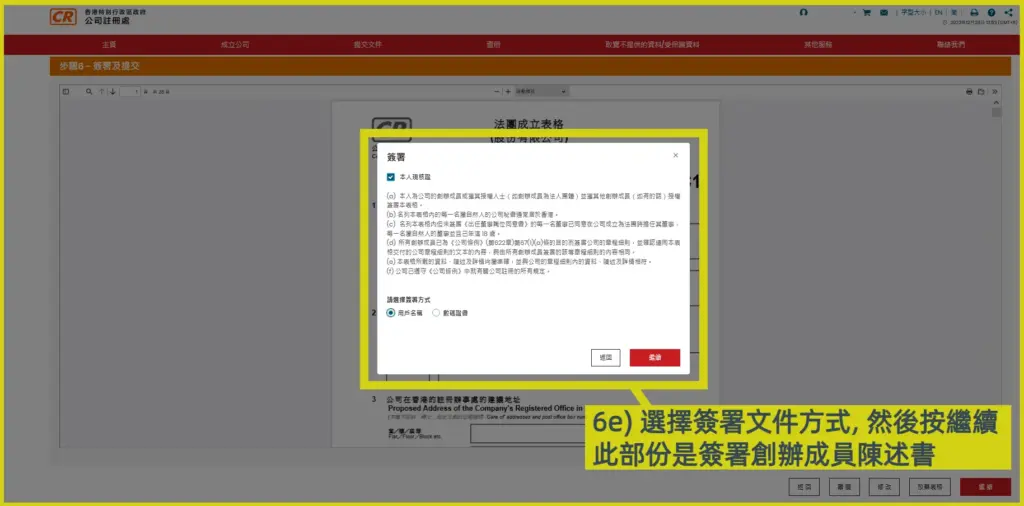
6e) The founder selects the method to sign the “Founder Member’s Statement”. After selecting the signing method, click Continue;
*In this tutorial, the online company application form is signed using the applicant’s username.
6f) The applicant enters the CR e-services username and password, then clicks Sign;
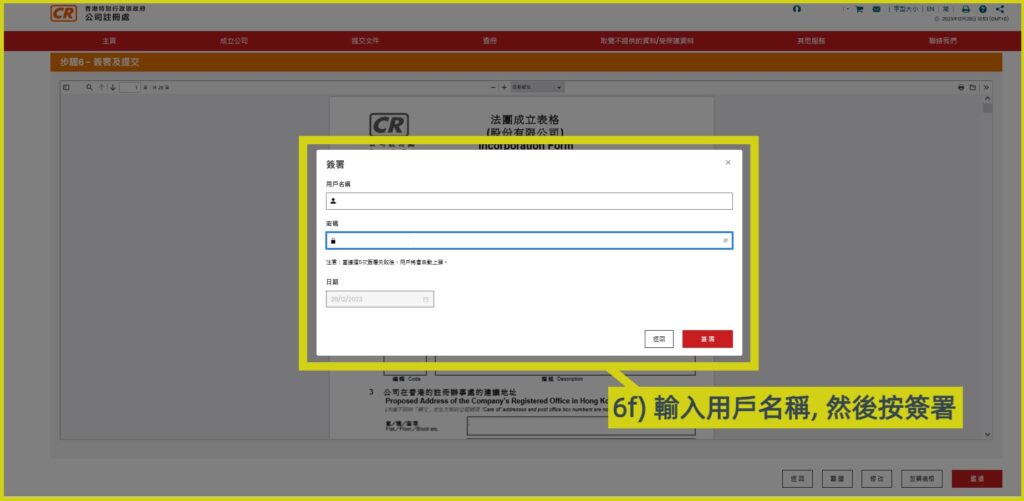
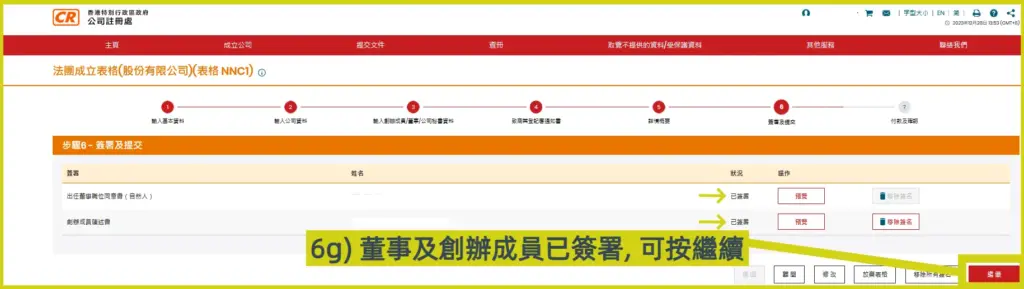
6g) The page will show that the first director and founder have signed the online company registration form. Click Continue;
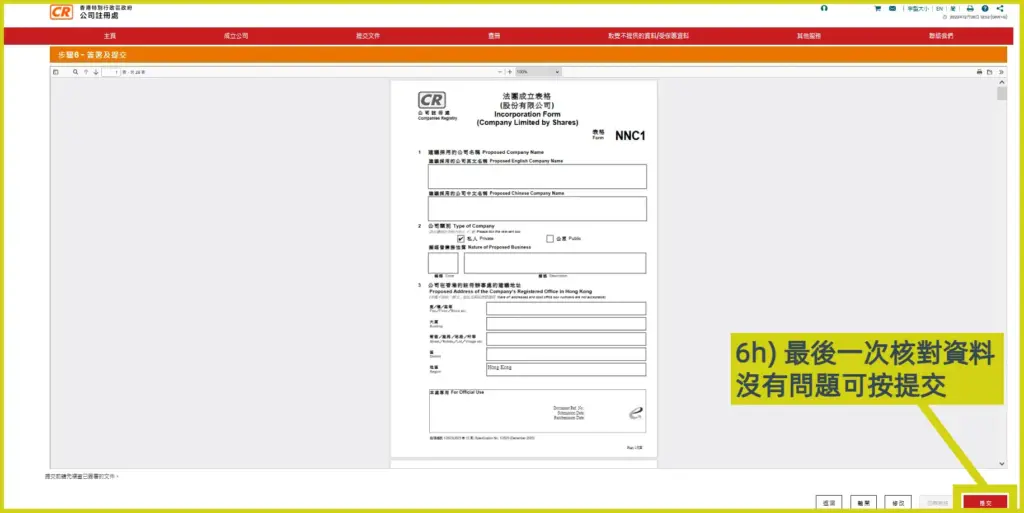
6h) Review the signed Incorporation Form (Form NNC1) one last time. If correct, click Submit;
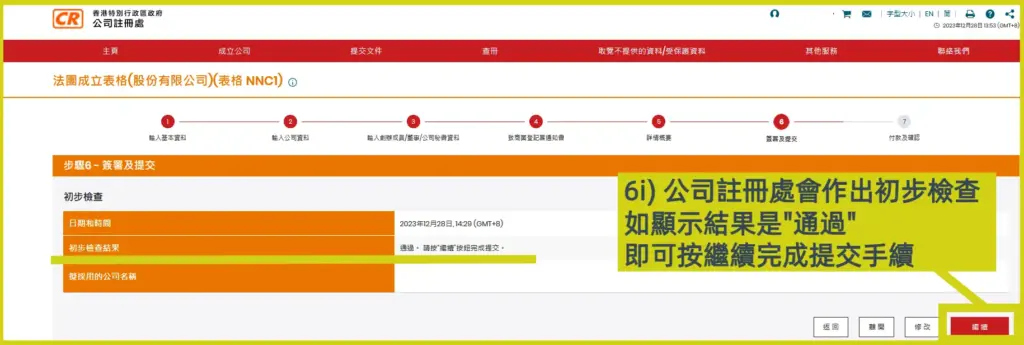
6i) The Companies Registry will conduct a preliminary check. If the result shows “Pass”, the proposed company name has passed the preliminary review and you may proceed. Click Continue to complete the online company incorporation submission process.
If the result shows “Reject”, it means the preliminary review has not been passed. The Companies Registry will specify the reason for rejection. It is recommended that the applicant withdraw the application and restart the online limited company registration process with another Hong Kong limited company name.
Step 7: Payment and confirmation
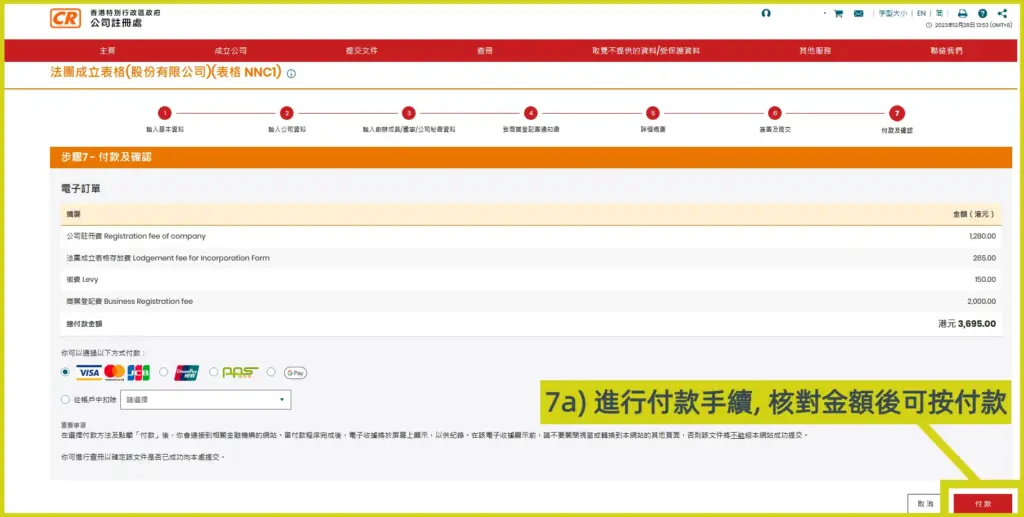
7a) Proceed with payment. Confirm the online company registration fee of HK$1,545 + the business registration fee of HK$2,350, totalling HK$3,895, then click Pay;
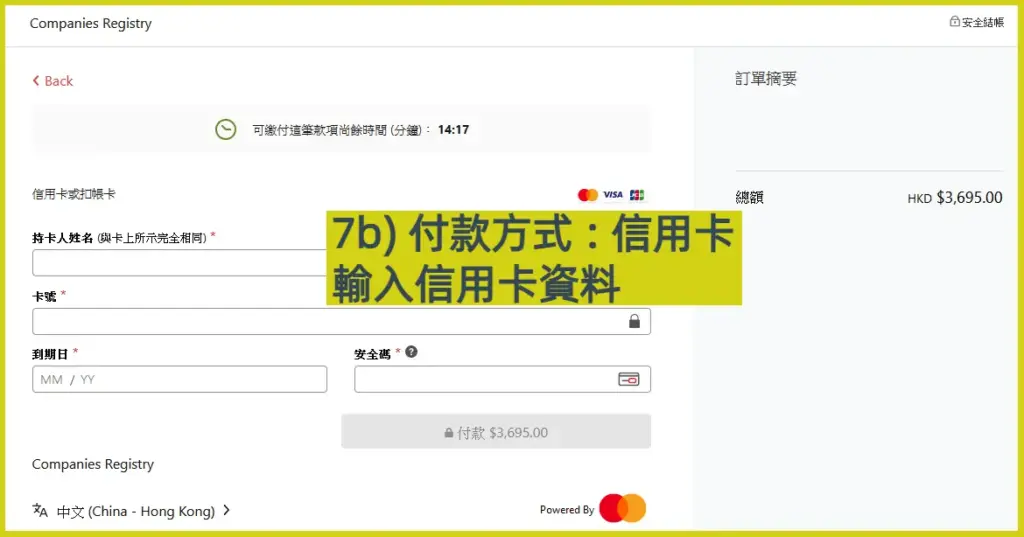
7b) Enter your credit card information;
**Note: This page will only remain for about 14 minutes. Please complete it promptly.**
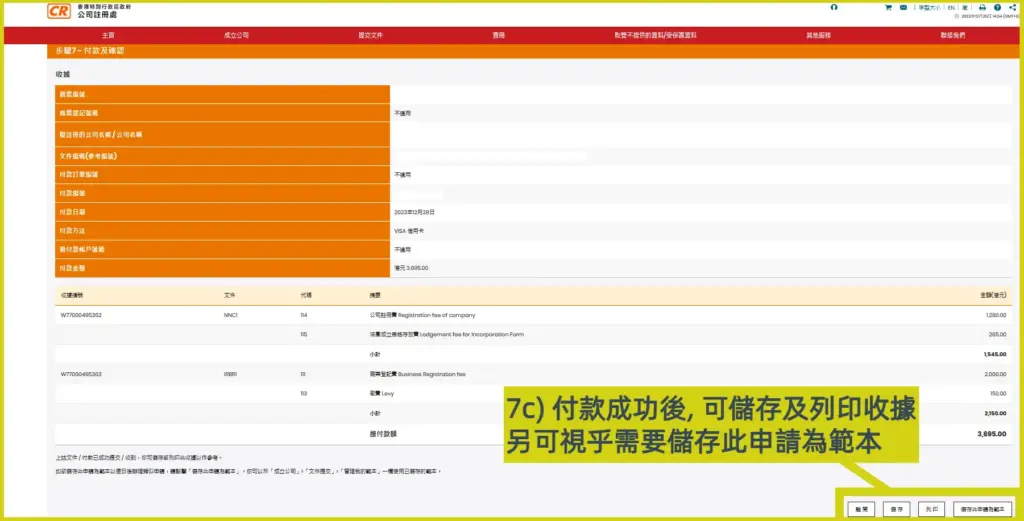
7c) After successful payment, the “7-step online company incorporation process” is complete. Once approved by the Companies Registry, the result will be notified by email.
How to download the electronic Certificate of Incorporation and BR?
1. After completing the online e-Incorporation application, the Companies Registry will email the e-services user a receipt for the business registration fee of the incorporated limited company.
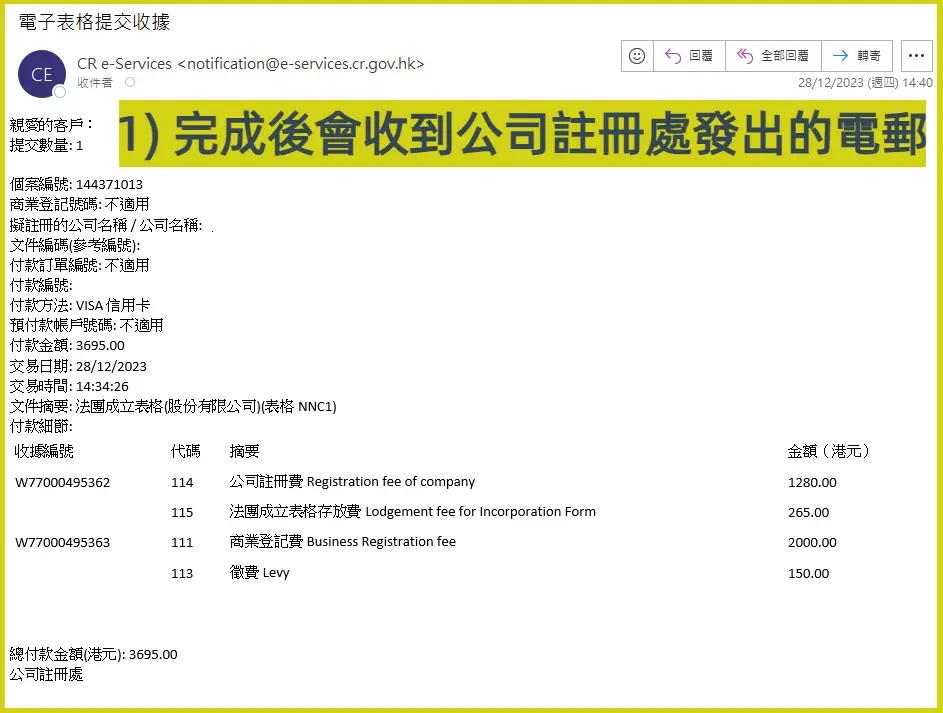
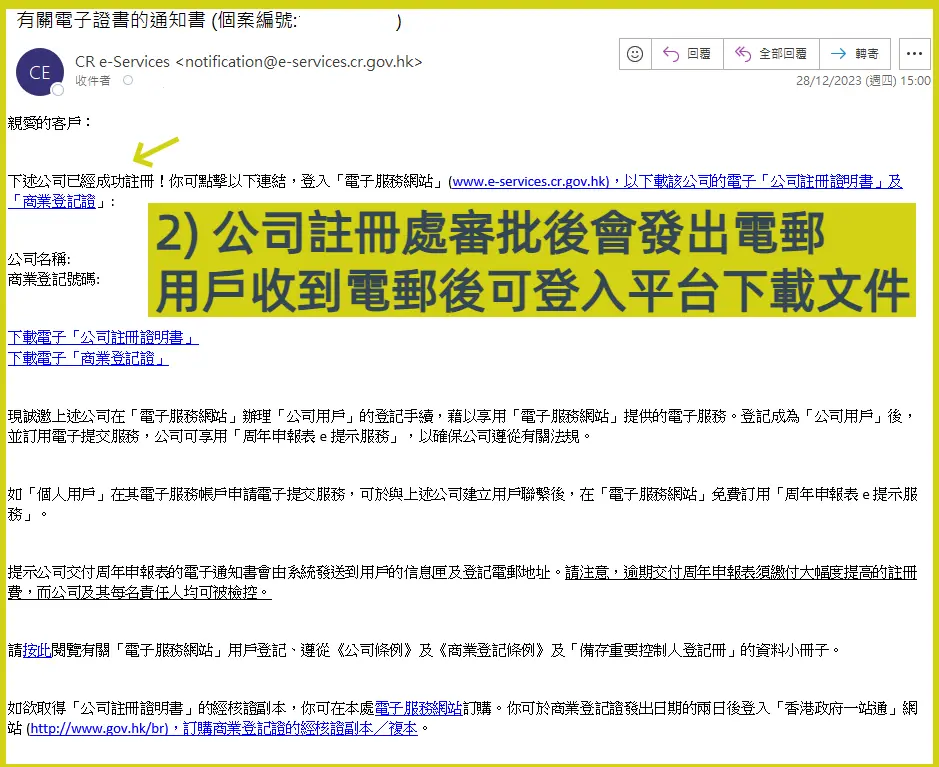
2. After the online company registration is approved, you will receive a notification of successful online incorporation of a Hong Kong limited company. You can then log in to the Companies Registry e-services website to download the Certificate of Incorporation and the Business Registration Certificate.
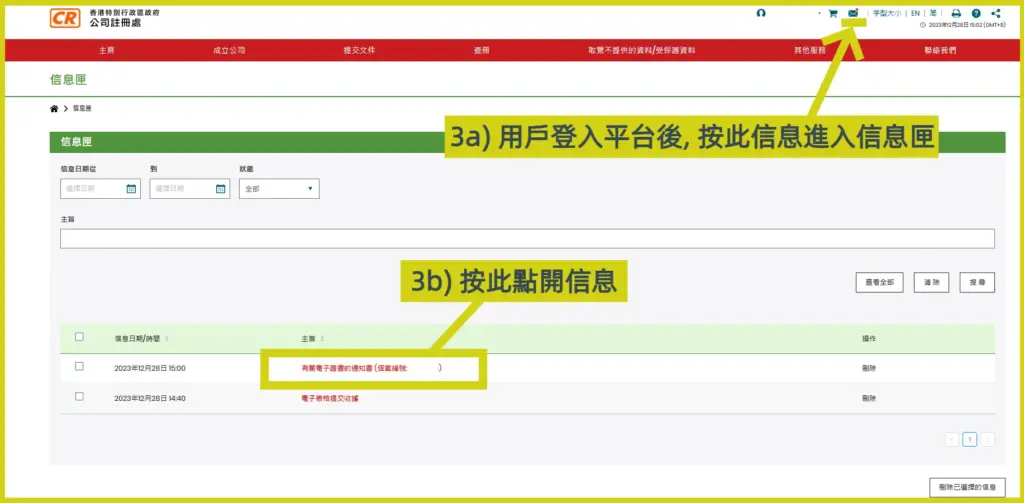
3. Log in to the platform, go to the Message Box, and open the message.
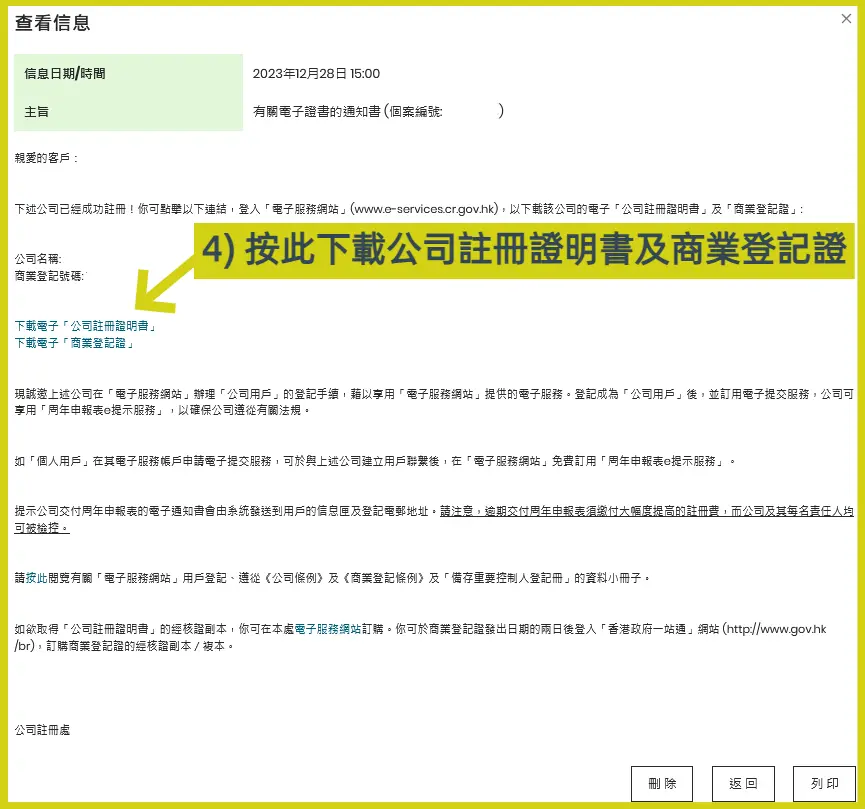
4. Download the Certificate of Incorporation and the Business Registration Certificate. Once you have successfully incorporated a limited company online, you can start doing business immediately.
Frequently Asked Questions
Q: Can non-Hong Kong residents incorporate a company in one day?
A: Yes. Please refer to another article: [Company Incorporation Requirements] Can non-Hong Kong residents start a company?
Q: If I register a company online, can I open a corporate bank account?
A: Yes. Please refer to another article: [Open a Company Bank Account] Hong Kong corporate bank account process, required documents, requirements, and fees
Conclusion
The above is a brief overview of the latest online company incorporation process for 2026, enabling aspiring entrepreneurs to use the e-Incorporation service to start a company on the same day.
Further reading:
Free consultation provided by General Accounting
Do you need to learn about General Accounting’s professional services?


