

The Hong Kong Inland Revenue Department officially launched the new “eTAX Individual Tax Portal (ITP)” on July 22, 2025. Please refer to our latest guide: Latest Guide to the eTAX Individual Tax Portal (ITP): One-Stop Tax Filing and Tax Management
Taxpayers who use e-filing should check their email inbox. On May 6, 2025, the Inland Revenue Department issued messages to eTAX accounts regarding the BIR60 tax return. eTAX users can log in to eTAX to view and file the 2024/25 Individual Tax Return.
Related reading: How much salary do you need to pay tax? A quick guide to Salaries Tax calculation, Personal Assessment, and allowances

What is eTAX?
eTAX is a two-way electronic tax filing platform launched by the Inland Revenue Department in 2008. In addition to receiving electronic tax returns and e-notifications, users can also file tax returns online and handle other tax matters via the eTAX platform, such as Individual Tax Return, Property Tax, Sole Proprietorship, Profits Tax Return, and other tax services(1).
Why apply for eTAX? What is eTAX used for?
Individual tax filing
Handle online matters relating to Salaries Tax, Property Tax for properties wholly owned, Profits Tax for sole proprietorships, and Personal Assessment, including:
- Complete and submit the Individual Tax Return (BIR60)
- Pre-fill records of deduction claims under the Individual Tax Return
- Instantly estimate Salaries Tax payable
- Update personal and company records
View tax information
- View your personal tax position and messages in the inbox
- Check whether there are any outstanding tax returns to be filed or taxes unpaid
- View tax returns submitted via eTAX, notices of assessment, and payment confirmation notices
- Check personal tax status
Property Tax
- View and submit Property Tax Returns for jointly owned properties (BIR57)
- Stamp duty for property transactions
- Stamping of tenancy agreements
Online e-services for sole proprietorships (unlimited company)
- Apply for a Business Registration Certificate View, apply for, or amend business registration records
- Complete and submit Profits Tax Returns
- Complete and submit Employer’s Return BIR56A
- Stamp duty for property and stock transfer instruments
Payments
- Pay taxes, business registration fees, and stamp duty
- Purchase Tax Reserve Certificates
Other
- Apply for business registration and request extracts of information from the Business Registration Register
- Submit an objection application online
- Apply for holdover of Provisional Tax
Related reading: Objection application | Apply for holdover of Provisional Tax
Benefits of eTAX
- Based on the salary information reported in Employer’s Return IR56B, the Inland Revenue Department will pre-fill your total income in your eTAX account.
- The tax return filing deadline can be automatically extended by one month
- File tax returns online anytime, anywhere
- Eco-friendly and convenient—no need to submit tax returns in person or by post
- Easy to review tax records and keep tax documents
- Email reminders for tax return and payment deadlines to help avoid late penalties
- No phone calls needed—log in to eTAX online 24/7 to view your tax position
- Pre-save previously reported deduction and allowance records
Information required to open an eTAX account
To apply for an eTAX account, please prepare one of the following credentials to log in to “eTAX”:
- Taxpayer Identification Number (TIN) and “eTAX” password
- Digital certificate issued by Hongkong Post Certification Authority
- Digital identity certificate under the Electronic Authentication Service
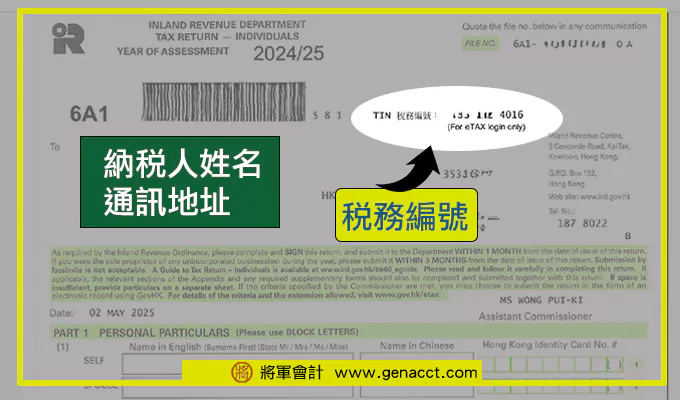
How can I find my Taxpayer Identification Number (TIN)?
Your TIN can be found at the top right-hand corner of the first page of your Individual Tax Return or Notice of Assessment.
Related reading: A breakdown of 4 key dates and highlights on your Salaries Tax demand note
4 key steps to apply for and open an eTAX account
Step 1: Apply for an “eTAX” password
New users registering for eTAX can log in to the eTAX website on GovHK and click “Apply for an ‘eTAX’ password”(2).

Step 2: Enter your details
Follow the instructions to enter your Hong Kong Identity Card number and Taxpayer Identification Number, then click “Confirm”.

Step 3: Save the information
After printing or saving the transaction details for applying for an “eTAX” password, click “Continue”.

Step 4: Complete
After completing the online application, you will receive an eTAX activation password in about 2–3 working days, and you can then use the eTAX e-filing service.

How do I apply for eTAX if I do not have a TIN?
If you are filing tax for the first time and the Inland Revenue Department has not yet created a tax file for you, you may complete Form IR6169 “Application for Opening an ‘eTAX’ Account (For applicants without an IRD file)”(2) and apply to open an “eTAX” account by post or fax.
After receiving the activation password, how do I activate and log in to eTAX?
After receiving your eTAX activation password, you may activate your personal eTAX account by following the 10 steps below:
eTAX login step 1: After receiving the activation password, log in to the eTAX website and click “Log in to eTAX now”.

eTAX login step 2: Click “Log in” at the bottom left.

eTAX login step 3: Enter your TIN and “eTAX password”/activation password, then click “Log in”.

eTAX login step 4: Click “Continue” at the bottom right.

eTAX login step 5: Read the terms and click “I accept the above terms” at the bottom right.

eTAX login step 6: Set a new TIN and password. You may keep your original TIN or set a new one, and change to a new login password. Finally, click “Continue”.

*Note: Please keep your new login TIN and password properly. Once changed, they cannot be changed again.
eTAX login step 7: Enter your password hint, email address, daytime contact number, mobile number, and preferred correspondence language, then click “Continue”.

eTAX login step 8: Select the e-notifications and documents for the Individual Tax Return and tick the relevant options.
☑ I wish to receive the following notices and documents in electronic record form and designate “GovHK” as the specified information system for receiving such notices and documents
and the following items:
☑ (a) Notices and documents relating to the submission of tax returns (including notice for submission of tax returns) – I intend to submit tax returns via the Internet (if applicable)
☑ (b) Notices and documents relating to assessment and payment of tax (including notice of assessment)
After completing the above steps, select “Yes” for receiving information by email, enter your contact details, and click “Continue”.

eTAX login step 9: Verify that the information is correct, then click “Confirm”.

eTAX login step 10: Completed. You may choose to save or print your “eTAX” user information. Click “Continue” to start using eTAX services immediately.

Forgot your TIN/password? Download the eTAX account form
Forgot your TIN
If you have forgotten your TIN and cannot find it on your tax return or notice of assessment, you may click the “Forgot TIN / Password” link in “eTAX” to request the Inland Revenue Department to send your TIN to your registered email address.
Forgot your password
If you have forgotten your eTAX password, you may click the “Forgot TIN / Password” link to request the Inland Revenue Department to email you your password hint.
If you have not registered a password hint, you may enter the phone number or email address registered under “User Profile” in your eTAX account. The IRD will mail you a new activation password to reset your eTAX password.
Download Form IR6104
To update your latest correspondence address with the IRD, you need to complete Form IR6104, “Application for ‘eTAX’ Account ‘TIN’ and/or ‘Activation Password’”, and submit your application for forgotten TIN/password by post or fax.
Conclusion
The above is the full process for applying for and activating an eTAX account. You may follow the eTAX account application steps to register your eTAX account and file tax returns online.
eTAX provides an electronic tax filing platform, including individual tax matters, property tax, personal business (company) matters, and payment services. If you forget your TIN or password, you may click the “Forgot TIN/Password” link to request the Inland Revenue Department to email you your password hint.
Further reading:
Sources:
1. GovHK
https://www.gov.hk/tc/residents/taxes/etax/information/know_more_about_etax.htm
2. eTAX password
https://www.gov.hk/tc/residents/taxes/etax/etax_password.htm
General Accounting offers free consultation


